Legacy code documentation before cleanup, handoff, or AI refactor.
Legacy code documentation is the missing first step when an inherited project still runs but nobody trusts the architecture. LegacyDoc AI generates JSDoc, Markdown docs, Mermaid diagrams, module summaries, and AI-ready context from your local VS Code workspace before cleanup, onboarding, or review.
Runs inside VS Code · BYOK · No code storage by RomantiCode
Review handoff snapshot
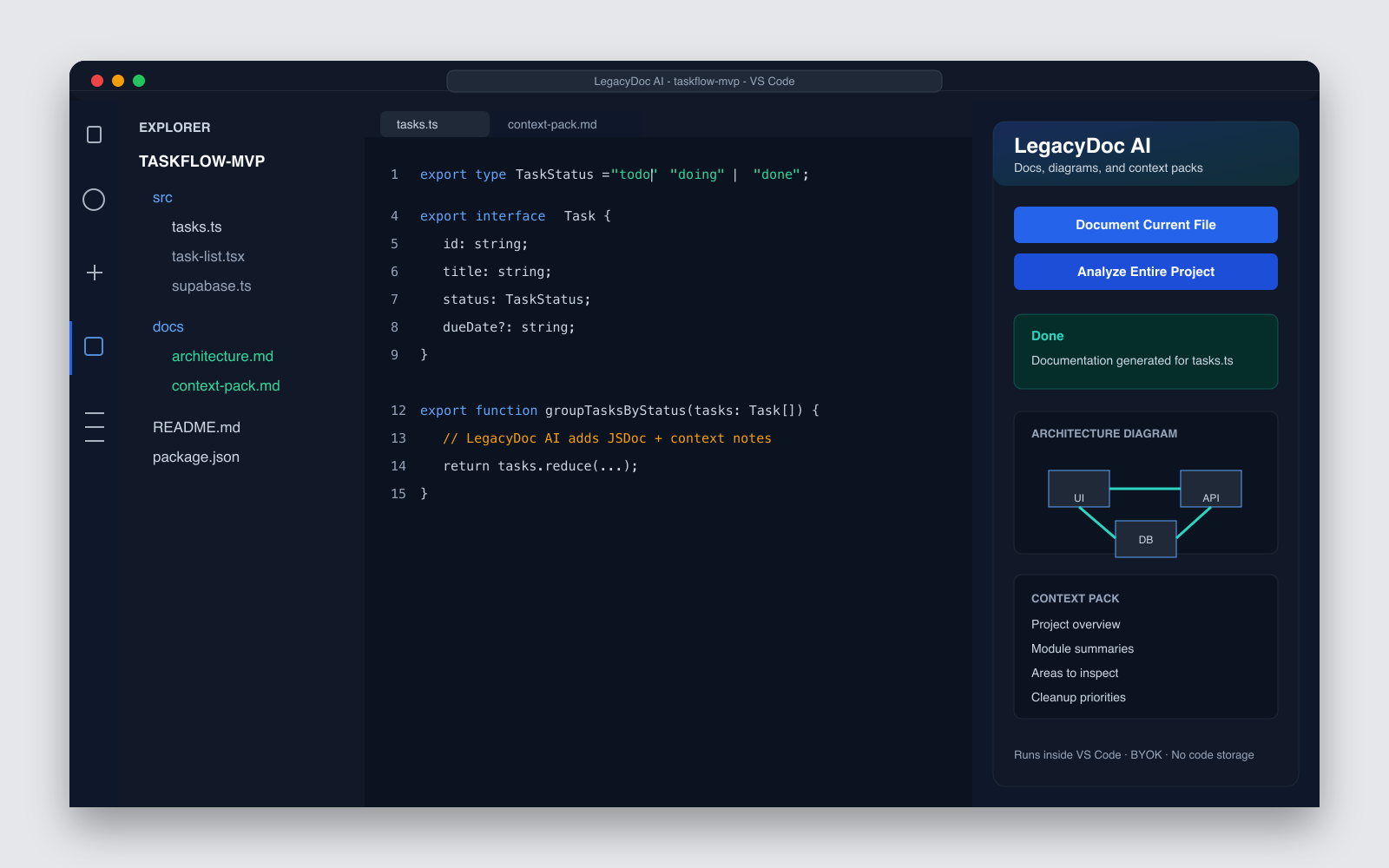
Audit focus
- Architecture map before cleanup
- Risky files and review boundaries
- Context pack for AI coding agents
Map
Audit
Handoff
If you searched
legacy code documentation
You probably have a working project that lacks comments, docs, and architecture context.
If you need
a codebase documentation generator
Turn an inherited project into docs, diagrams, and AI-ready context before any cleanup or handoff.
If you need
document legacy code
Generate readable docs before onboarding a developer or starting a cleanup sprint.
If you use AI
AI documentation for legacy code
Give Claude Code, Cursor, or Codex a project context pack before asking for changes.
Legacy code documentation outputs before touching old code
A useful legacy code documentation pass should create facts first, not a rewrite plan.
JSDoc and inline comments
Explain functions, parameters, return values, and non-obvious behavior without changing logic.
Markdown module docs
Create folder and file summaries that a new developer can read before opening the code.
Mermaid architecture map
Show how routes, modules, services, and data flows connect across the project.
Setup and environment notes
Capture commands, environment variables, entry points, and configuration assumptions.
Areas to inspect
Flag large files, duplicated logic, missing docs, brittle config, and unclear boundaries.
AI-ready context pack
Package the important facts so AI coding tools can work with project context.
A safer legacy code documentation workflow
The goal is to make the codebase understandable before cleanup, not to let AI rewrite it blind.
-
01
Open locally
Open the project in VS Code and choose the file or folder to document.
-
02
Generate docs
Create JSDoc, Markdown summaries, and Mermaid architecture diagrams.
-
03
Review output
Check the generated notes against the real code before sharing them.
-
04
Build context
Turn the docs into a project context pack for humans or AI tools.
-
05
Plan cleanup
Only then create small refactor tasks or hand off to a developer.
Why this matters
Legacy code documentation is a ranking and product problem
People do not search for legacy code documentation because they want a prettier README. They search because an old system is blocking a real task: onboarding a developer, estimating cleanup work, moving a feature, replacing a vendor, or asking an AI coding agent to explain code that nobody on the team fully understands.
That is why this page focuses on legacy code documentation as a practical workflow. The page is not trying to sell automatic modernization. It is designed for the moment before modernization, when the team needs a clear map, a module inventory, a set of assumptions, and enough context to decide what can be changed safely.
Search intent
The user wants to understand existing code, not read a generic article about technical debt.
Useful output
The result should be module docs, architecture notes, setup context, and handoff material.
Risk boundary
Legacy code documentation should avoid pretending that generated docs are always correct.
Business value
Good documentation reduces cleanup estimates, onboarding time, and risky AI refactor prompts.
Legacy code documentation checklist
Use this checklist before you treat generated docs as real handoff material.
Scope is narrow enough
Run legacy code documentation on a folder, feature, or service first. Whole-repo documentation is useful only after the core boundaries are understood.
Architecture claims are traceable
Each generated diagram should map to files, routes, services, or functions that a reviewer can open and inspect.
Setup assumptions are explicit
Document commands, environment variables, local services, build steps, and hidden dependencies that usually live in someone's memory.
Risk notes are separated
Keep facts, assumptions, missing tests, old dependencies, and unclear ownership in separate sections so cleanup work can be planned.
AI context is reusable
Convert legacy code documentation into a context pack that Claude Code, Cursor, Codex, or a human reviewer can reuse.
Next action is small
End with a short list of inspection or cleanup tasks, not a broad instruction to rewrite the whole project.
Legacy code documentation before refactoring
For inherited or old projects, documentation is the first cleanup layer.
| Task | Best first output | Why it matters |
|---|---|---|
| Onboard a developer | Module summaries and setup notes | Reduces the first week of guessing. |
| Use AI to explain code | AI-ready context pack | Lets the AI reason from project facts instead of isolated snippets. |
| Plan cleanup | Architecture map and areas to inspect | Shows where cleanup can start safely. |
| Refactor later | Small reviewable task list | Avoids one large rewrite with unclear risk. |
What LegacyDoc AI does
- — Generates documentation from local code in VS Code.
- — Creates architecture maps and project context packs.
- — Helps humans and AI tools understand inherited codebases.
- — Keeps RomantiCode out of your code storage path.
What it does not do
- — It does not automatically refactor or modernize code.
- — It does not replace senior engineering judgment.
- — It does not perform formal security audits.
- — It does not store your code on RomantiCode servers.
Definition of done
When legacy code documentation is good enough for handoff
Legacy code documentation is not finished when a generator creates a long document. It is finished when a new reviewer can answer the first practical questions without guessing: where does the app start, which files own the risky behavior, what commands make the project run, what data crosses module boundaries, and what assumptions need to be checked before cleanup.
That is also why LegacyDoc AI keeps the output reviewable. The generated notes should point back to files and folders, separate facts from assumptions, and create a small next-action list. A developer, founder, or AI coding agent should be able to use the docs to inspect one feature at a time instead of rewriting the whole project from a vague prompt.
Entry points are named
The handoff should identify routes, startup files, scripts, background jobs, and the first modules a reviewer should open.
Boundaries are visible
The docs should show which modules call each other, where external services appear, and where data leaves the project.
Assumptions are marked
Generated explanations should label uncertain behavior, missing tests, hidden config, and places that require manual verification.
Next tasks are small
The output should end with reviewable inspection tasks, cleanup candidates, and context that can be reused in Claude Code, Cursor, or Codex.
Related resources
Product
LegacyDoc AI
The VS Code extension that generates docs, diagrams, and context packs.
Tool
AI Code Audit Report
Use documentation as the base layer for audit-ready project context.
Use case
AI Codebase Context
Create a compact project brief before asking Claude Code, Cursor, or Codex to change code.
Use case
Vibe Code Cleanup
Prepare AI-generated apps for cleanup with context and priorities.
FAQ
What is legacy code documentation?
Legacy code documentation is the practical record of what an existing codebase does: module summaries, function notes, setup assumptions, architecture diagrams, and handoff context that help a developer change old code safely.
How do I document legacy code with AI?
Start by generating module summaries, JSDoc, Markdown documentation, and an architecture map from the existing codebase. Then review the output before using it for onboarding, cleanup, or refactoring.
Is this a codebase documentation generator?
Yes. LegacyDoc AI turns a local codebase into docs, architecture maps, and AI-ready context inside VS Code before you clean it up or hand it off.
Can LegacyDoc AI generate documentation for an existing codebase?
Yes. LegacyDoc AI runs inside VS Code and can generate JSDoc, Markdown docs, Mermaid architecture diagrams, and AI-ready context packs from local files and folders.
Does it rewrite or modernize legacy code?
No. LegacyDoc AI generates documentation and context. It does not automatically refactor, rewrite, or modernize your code logic.
Is this only for old legacy systems?
No. It also works for inherited projects, undocumented internal tools, AI-generated apps, and vibe-coded prototypes that need documentation before cleanup.
Can I use the generated documentation with Claude Code, Cursor, or Codex?
Yes. The generated context pack is designed to help AI coding tools understand the project before you ask them to review, refactor, or explain code.
Does RomantiCode store my code?
No. LegacyDoc AI runs inside VS Code. Your code is sent directly to the AI provider you configure with your own API key, not to RomantiCode servers.
Generate documentation before the next cleanup pass
Install LegacyDoc AI in VS Code and create docs, diagrams, and context from your local codebase.
legacy code documentation decision checklist
This section keeps legacy code documentation focused on one search intent. A reader comparing options for legacy code documentation should quickly see the task, the evidence, the handoff value, and the next action without leaving the page.
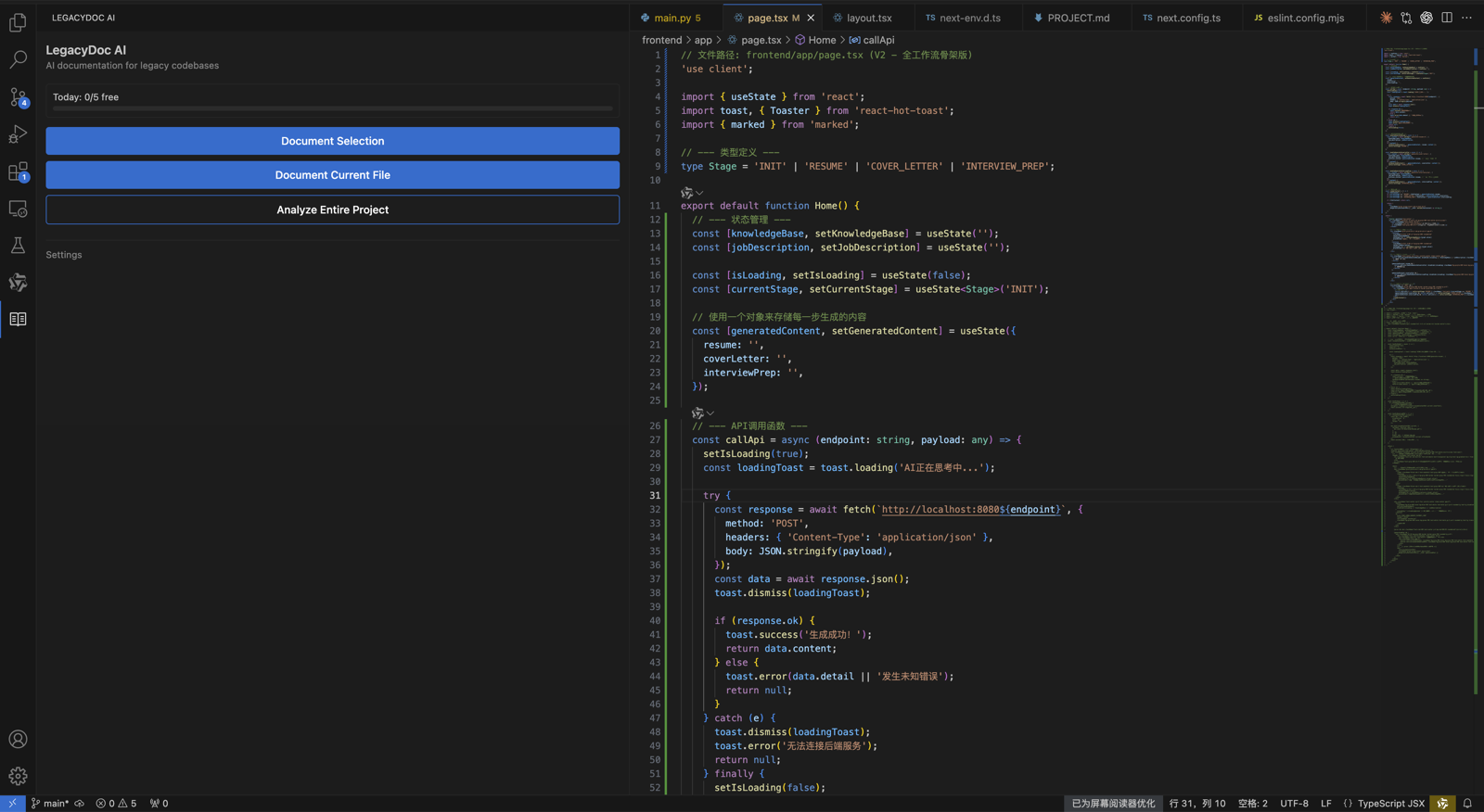
legacy code documentation checkpoint 1
Use legacy code documentation as the page promise, then verify that legacy code documentation is supported by the headline, the example, the internal links, the call to action, and the reader's next step. A strong legacy code documentation page should explain who needs legacy code documentation, what evidence is required before acting, and how RomantiCode reduces uncertainty for founders, developers, cleanup specialists, and AI coding agents. Keep the legacy code documentation checklist tied to a real workflow: inspect the codebase, map risky files, prepare context, compare options, and decide whether to audit, refactor, hire help, or continue with an AI assistant.
legacy code documentation checkpoint 2
Use legacy code documentation as the page promise, then verify that legacy code documentation is supported by the headline, the example, the internal links, the call to action, and the reader's next step. A strong legacy code documentation page should explain who needs legacy code documentation, what evidence is required before acting, and how RomantiCode reduces uncertainty for founders, developers, cleanup specialists, and AI coding agents. Keep the legacy code documentation checklist tied to a real workflow: inspect the codebase, map risky files, prepare context, compare options, and decide whether to audit, refactor, hire help, or continue with an AI assistant.
legacy code documentation checkpoint 3
Use legacy code documentation as the page promise, then verify that legacy code documentation is supported by the headline, the example, the internal links, the call to action, and the reader's next step. A strong legacy code documentation page should explain who needs legacy code documentation, what evidence is required before acting, and how RomantiCode reduces uncertainty for founders, developers, cleanup specialists, and AI coding agents. Keep the legacy code documentation checklist tied to a real workflow: inspect the codebase, map risky files, prepare context, compare options, and decide whether to audit, refactor, hire help, or continue with an AI assistant.
legacy code documentation checkpoint 4
Use legacy code documentation as the page promise, then verify that legacy code documentation is supported by the headline, the example, the internal links, the call to action, and the reader's next step. A strong legacy code documentation page should explain who needs legacy code documentation, what evidence is required before acting, and how RomantiCode reduces uncertainty for founders, developers, cleanup specialists, and AI coding agents. Keep the legacy code documentation checklist tied to a real workflow: inspect the codebase, map risky files, prepare context, compare options, and decide whether to audit, refactor, hire help, or continue with an AI assistant.
legacy code documentation checkpoint 5
Use legacy code documentation as the page promise, then verify that legacy code documentation is supported by the headline, the example, the internal links, the call to action, and the reader's next step. A strong legacy code documentation page should explain who needs legacy code documentation, what evidence is required before acting, and how RomantiCode reduces uncertainty for founders, developers, cleanup specialists, and AI coding agents. Keep the legacy code documentation checklist tied to a real workflow: inspect the codebase, map risky files, prepare context, compare options, and decide whether to audit, refactor, hire help, or continue with an AI assistant.
legacy code documentation checkpoint 6
Use legacy code documentation as the page promise, then verify that legacy code documentation is supported by the headline, the example, the internal links, the call to action, and the reader's next step. A strong legacy code documentation page should explain who needs legacy code documentation, what evidence is required before acting, and how RomantiCode reduces uncertainty for founders, developers, cleanup specialists, and AI coding agents. Keep the legacy code documentation checklist tied to a real workflow: inspect the codebase, map risky files, prepare context, compare options, and decide whether to audit, refactor, hire help, or continue with an AI assistant.
legacy code documentation checkpoint 7
Use legacy code documentation as the page promise, then verify that legacy code documentation is supported by the headline, the example, the internal links, the call to action, and the reader's next step. A strong legacy code documentation page should explain who needs legacy code documentation, what evidence is required before acting, and how RomantiCode reduces uncertainty for founders, developers, cleanup specialists, and AI coding agents. Keep the legacy code documentation checklist tied to a real workflow: inspect the codebase, map risky files, prepare context, compare options, and decide whether to audit, refactor, hire help, or continue with an AI assistant.
legacy code documentation checkpoint 8
Use legacy code documentation as the page promise, then verify that legacy code documentation is supported by the headline, the example, the internal links, the call to action, and the reader's next step. A strong legacy code documentation page should explain who needs legacy code documentation, what evidence is required before acting, and how RomantiCode reduces uncertainty for founders, developers, cleanup specialists, and AI coding agents. Keep the legacy code documentation checklist tied to a real workflow: inspect the codebase, map risky files, prepare context, compare options, and decide whether to audit, refactor, hire help, or continue with an AI assistant.
legacy code documentation checkpoint 9
Use legacy code documentation as the page promise, then verify that legacy code documentation is supported by the headline, the example, the internal links, the call to action, and the reader's next step. A strong legacy code documentation page should explain who needs legacy code documentation, what evidence is required before acting, and how RomantiCode reduces uncertainty for founders, developers, cleanup specialists, and AI coding agents. Keep the legacy code documentation checklist tied to a real workflow: inspect the codebase, map risky files, prepare context, compare options, and decide whether to audit, refactor, hire help, or continue with an AI assistant.
legacy code documentation checkpoint 10
Use legacy code documentation as the page promise, then verify that legacy code documentation is supported by the headline, the example, the internal links, the call to action, and the reader's next step. A strong legacy code documentation page should explain who needs legacy code documentation, what evidence is required before acting, and how RomantiCode reduces uncertainty for founders, developers, cleanup specialists, and AI coding agents. Keep the legacy code documentation checklist tied to a real workflow: inspect the codebase, map risky files, prepare context, compare options, and decide whether to audit, refactor, hire help, or continue with an AI assistant.
legacy code documentation checkpoint 11
Use legacy code documentation as the page promise, then verify that legacy code documentation is supported by the headline, the example, the internal links, the call to action, and the reader's next step. A strong legacy code documentation page should explain who needs legacy code documentation, what evidence is required before acting, and how RomantiCode reduces uncertainty for founders, developers, cleanup specialists, and AI coding agents. Keep the legacy code documentation checklist tied to a real workflow: inspect the codebase, map risky files, prepare context, compare options, and decide whether to audit, refactor, hire help, or continue with an AI assistant.
legacy code documentation checkpoint 12
Use legacy code documentation as the page promise, then verify that legacy code documentation is supported by the headline, the example, the internal links, the call to action, and the reader's next step. A strong legacy code documentation page should explain who needs legacy code documentation, what evidence is required before acting, and how RomantiCode reduces uncertainty for founders, developers, cleanup specialists, and AI coding agents. Keep the legacy code documentation checklist tied to a real workflow: inspect the codebase, map risky files, prepare context, compare options, and decide whether to audit, refactor, hire help, or continue with an AI assistant.
legacy code documentation checkpoint 13
Use legacy code documentation as the page promise, then verify that legacy code documentation is supported by the headline, the example, the internal links, the call to action, and the reader's next step. A strong legacy code documentation page should explain who needs legacy code documentation, what evidence is required before acting, and how RomantiCode reduces uncertainty for founders, developers, cleanup specialists, and AI coding agents. Keep the legacy code documentation checklist tied to a real workflow: inspect the codebase, map risky files, prepare context, compare options, and decide whether to audit, refactor, hire help, or continue with an AI assistant.
legacy code documentation checkpoint 14
Use legacy code documentation as the page promise, then verify that legacy code documentation is supported by the headline, the example, the internal links, the call to action, and the reader's next step. A strong legacy code documentation page should explain who needs legacy code documentation, what evidence is required before acting, and how RomantiCode reduces uncertainty for founders, developers, cleanup specialists, and AI coding agents. Keep the legacy code documentation checklist tied to a real workflow: inspect the codebase, map risky files, prepare context, compare options, and decide whether to audit, refactor, hire help, or continue with an AI assistant.
legacy code documentation checkpoint 15
Use legacy code documentation as the page promise, then verify that legacy code documentation is supported by the headline, the example, the internal links, the call to action, and the reader's next step. A strong legacy code documentation page should explain who needs legacy code documentation, what evidence is required before acting, and how RomantiCode reduces uncertainty for founders, developers, cleanup specialists, and AI coding agents. Keep the legacy code documentation checklist tied to a real workflow: inspect the codebase, map risky files, prepare context, compare options, and decide whether to audit, refactor, hire help, or continue with an AI assistant.
legacy code documentation checkpoint 16
Use legacy code documentation as the page promise, then verify that legacy code documentation is supported by the headline, the example, the internal links, the call to action, and the reader's next step. A strong legacy code documentation page should explain who needs legacy code documentation, what evidence is required before acting, and how RomantiCode reduces uncertainty for founders, developers, cleanup specialists, and AI coding agents. Keep the legacy code documentation checklist tied to a real workflow: inspect the codebase, map risky files, prepare context, compare options, and decide whether to audit, refactor, hire help, or continue with an AI assistant.
legacy code documentation checkpoint 17
Use legacy code documentation as the page promise, then verify that legacy code documentation is supported by the headline, the example, the internal links, the call to action, and the reader's next step. A strong legacy code documentation page should explain who needs legacy code documentation, what evidence is required before acting, and how RomantiCode reduces uncertainty for founders, developers, cleanup specialists, and AI coding agents. Keep the legacy code documentation checklist tied to a real workflow: inspect the codebase, map risky files, prepare context, compare options, and decide whether to audit, refactor, hire help, or continue with an AI assistant.
legacy code documentation checkpoint 18
Use legacy code documentation as the page promise, then verify that legacy code documentation is supported by the headline, the example, the internal links, the call to action, and the reader's next step. A strong legacy code documentation page should explain who needs legacy code documentation, what evidence is required before acting, and how RomantiCode reduces uncertainty for founders, developers, cleanup specialists, and AI coding agents. Keep the legacy code documentation checklist tied to a real workflow: inspect the codebase, map risky files, prepare context, compare options, and decide whether to audit, refactor, hire help, or continue with an AI assistant.
legacy code documentation checkpoint 19
Use legacy code documentation as the page promise, then verify that legacy code documentation is supported by the headline, the example, the internal links, the call to action, and the reader's next step. A strong legacy code documentation page should explain who needs legacy code documentation, what evidence is required before acting, and how RomantiCode reduces uncertainty for founders, developers, cleanup specialists, and AI coding agents. Keep the legacy code documentation checklist tied to a real workflow: inspect the codebase, map risky files, prepare context, compare options, and decide whether to audit, refactor, hire help, or continue with an AI assistant.
legacy code documentation checkpoint 20
Use legacy code documentation as the page promise, then verify that legacy code documentation is supported by the headline, the example, the internal links, the call to action, and the reader's next step. A strong legacy code documentation page should explain who needs legacy code documentation, what evidence is required before acting, and how RomantiCode reduces uncertainty for founders, developers, cleanup specialists, and AI coding agents. Keep the legacy code documentation checklist tied to a real workflow: inspect the codebase, map risky files, prepare context, compare options, and decide whether to audit, refactor, hire help, or continue with an AI assistant.
legacy code documentation checkpoint 21
Use legacy code documentation as the page promise, then verify that legacy code documentation is supported by the headline, the example, the internal links, the call to action, and the reader's next step. A strong legacy code documentation page should explain who needs legacy code documentation, what evidence is required before acting, and how RomantiCode reduces uncertainty for founders, developers, cleanup specialists, and AI coding agents. Keep the legacy code documentation checklist tied to a real workflow: inspect the codebase, map risky files, prepare context, compare options, and decide whether to audit, refactor, hire help, or continue with an AI assistant.
legacy code documentation checkpoint 22
Use legacy code documentation as the page promise, then verify that legacy code documentation is supported by the headline, the example, the internal links, the call to action, and the reader's next step. A strong legacy code documentation page should explain who needs legacy code documentation, what evidence is required before acting, and how RomantiCode reduces uncertainty for founders, developers, cleanup specialists, and AI coding agents. Keep the legacy code documentation checklist tied to a real workflow: inspect the codebase, map risky files, prepare context, compare options, and decide whether to audit, refactor, hire help, or continue with an AI assistant.
legacy code documentation checkpoint 23
Use legacy code documentation as the page promise, then verify that legacy code documentation is supported by the headline, the example, the internal links, the call to action, and the reader's next step. A strong legacy code documentation page should explain who needs legacy code documentation, what evidence is required before acting, and how RomantiCode reduces uncertainty for founders, developers, cleanup specialists, and AI coding agents. Keep the legacy code documentation checklist tied to a real workflow: inspect the codebase, map risky files, prepare context, compare options, and decide whether to audit, refactor, hire help, or continue with an AI assistant.
legacy code documentation checkpoint 24
Use legacy code documentation as the page promise, then verify that legacy code documentation is supported by the headline, the example, the internal links, the call to action, and the reader's next step. A strong legacy code documentation page should explain who needs legacy code documentation, what evidence is required before acting, and how RomantiCode reduces uncertainty for founders, developers, cleanup specialists, and AI coding agents. Keep the legacy code documentation checklist tied to a real workflow: inspect the codebase, map risky files, prepare context, compare options, and decide whether to audit, refactor, hire help, or continue with an AI assistant.
legacy code documentation checkpoint 25
Use legacy code documentation as the page promise, then verify that legacy code documentation is supported by the headline, the example, the internal links, the call to action, and the reader's next step. A strong legacy code documentation page should explain who needs legacy code documentation, what evidence is required before acting, and how RomantiCode reduces uncertainty for founders, developers, cleanup specialists, and AI coding agents. Keep the legacy code documentation checklist tied to a real workflow: inspect the codebase, map risky files, prepare context, compare options, and decide whether to audit, refactor, hire help, or continue with an AI assistant.
legacy code documentation checkpoint 26
Use legacy code documentation as the page promise, then verify that legacy code documentation is supported by the headline, the example, the internal links, the call to action, and the reader's next step. A strong legacy code documentation page should explain who needs legacy code documentation, what evidence is required before acting, and how RomantiCode reduces uncertainty for founders, developers, cleanup specialists, and AI coding agents. Keep the legacy code documentation checklist tied to a real workflow: inspect the codebase, map risky files, prepare context, compare options, and decide whether to audit, refactor, hire help, or continue with an AI assistant.
legacy code documentation checkpoint 27
Use legacy code documentation as the page promise, then verify that legacy code documentation is supported by the headline, the example, the internal links, the call to action, and the reader's next step. A strong legacy code documentation page should explain who needs legacy code documentation, what evidence is required before acting, and how RomantiCode reduces uncertainty for founders, developers, cleanup specialists, and AI coding agents. Keep the legacy code documentation checklist tied to a real workflow: inspect the codebase, map risky files, prepare context, compare options, and decide whether to audit, refactor, hire help, or continue with an AI assistant.
legacy code documentation checkpoint 28
Use legacy code documentation as the page promise, then verify that legacy code documentation is supported by the headline, the example, the internal links, the call to action, and the reader's next step. A strong legacy code documentation page should explain who needs legacy code documentation, what evidence is required before acting, and how RomantiCode reduces uncertainty for founders, developers, cleanup specialists, and AI coding agents. Keep the legacy code documentation checklist tied to a real workflow: inspect the codebase, map risky files, prepare context, compare options, and decide whether to audit, refactor, hire help, or continue with an AI assistant.
legacy code documentation checkpoint 29
Use legacy code documentation as the page promise, then verify that legacy code documentation is supported by the headline, the example, the internal links, the call to action, and the reader's next step. A strong legacy code documentation page should explain who needs legacy code documentation, what evidence is required before acting, and how RomantiCode reduces uncertainty for founders, developers, cleanup specialists, and AI coding agents. Keep the legacy code documentation checklist tied to a real workflow: inspect the codebase, map risky files, prepare context, compare options, and decide whether to audit, refactor, hire help, or continue with an AI assistant.
legacy code documentation checkpoint 30
Use legacy code documentation as the page promise, then verify that legacy code documentation is supported by the headline, the example, the internal links, the call to action, and the reader's next step. A strong legacy code documentation page should explain who needs legacy code documentation, what evidence is required before acting, and how RomantiCode reduces uncertainty for founders, developers, cleanup specialists, and AI coding agents. Keep the legacy code documentation checklist tied to a real workflow: inspect the codebase, map risky files, prepare context, compare options, and decide whether to audit, refactor, hire help, or continue with an AI assistant.
legacy code documentation checkpoint 31
Use legacy code documentation as the page promise, then verify that legacy code documentation is supported by the headline, the example, the internal links, the call to action, and the reader's next step. A strong legacy code documentation page should explain who needs legacy code documentation, what evidence is required before acting, and how RomantiCode reduces uncertainty for founders, developers, cleanup specialists, and AI coding agents. Keep the legacy code documentation checklist tied to a real workflow: inspect the codebase, map risky files, prepare context, compare options, and decide whether to audit, refactor, hire help, or continue with an AI assistant.
legacy code documentation checkpoint 32
Use legacy code documentation as the page promise, then verify that legacy code documentation is supported by the headline, the example, the internal links, the call to action, and the reader's next step. A strong legacy code documentation page should explain who needs legacy code documentation, what evidence is required before acting, and how RomantiCode reduces uncertainty for founders, developers, cleanup specialists, and AI coding agents. Keep the legacy code documentation checklist tied to a real workflow: inspect the codebase, map risky files, prepare context, compare options, and decide whether to audit, refactor, hire help, or continue with an AI assistant.
legacy code documentation checkpoint 33
Use legacy code documentation as the page promise, then verify that legacy code documentation is supported by the headline, the example, the internal links, the call to action, and the reader's next step. A strong legacy code documentation page should explain who needs legacy code documentation, what evidence is required before acting, and how RomantiCode reduces uncertainty for founders, developers, cleanup specialists, and AI coding agents. Keep the legacy code documentation checklist tied to a real workflow: inspect the codebase, map risky files, prepare context, compare options, and decide whether to audit, refactor, hire help, or continue with an AI assistant.
legacy code documentation checkpoint 34
Use legacy code documentation as the page promise, then verify that legacy code documentation is supported by the headline, the example, the internal links, the call to action, and the reader's next step. A strong legacy code documentation page should explain who needs legacy code documentation, what evidence is required before acting, and how RomantiCode reduces uncertainty for founders, developers, cleanup specialists, and AI coding agents. Keep the legacy code documentation checklist tied to a real workflow: inspect the codebase, map risky files, prepare context, compare options, and decide whether to audit, refactor, hire help, or continue with an AI assistant.
legacy code documentation checkpoint 35
Use legacy code documentation as the page promise, then verify that legacy code documentation is supported by the headline, the example, the internal links, the call to action, and the reader's next step. A strong legacy code documentation page should explain who needs legacy code documentation, what evidence is required before acting, and how RomantiCode reduces uncertainty for founders, developers, cleanup specialists, and AI coding agents. Keep the legacy code documentation checklist tied to a real workflow: inspect the codebase, map risky files, prepare context, compare options, and decide whether to audit, refactor, hire help, or continue with an AI assistant.
legacy code documentation checkpoint 36
Use legacy code documentation as the page promise, then verify that legacy code documentation is supported by the headline, the example, the internal links, the call to action, and the reader's next step. A strong legacy code documentation page should explain who needs legacy code documentation, what evidence is required before acting, and how RomantiCode reduces uncertainty for founders, developers, cleanup specialists, and AI coding agents. Keep the legacy code documentation checklist tied to a real workflow: inspect the codebase, map risky files, prepare context, compare options, and decide whether to audit, refactor, hire help, or continue with an AI assistant.
legacy code documentation checkpoint 37
Use legacy code documentation as the page promise, then verify that legacy code documentation is supported by the headline, the example, the internal links, the call to action, and the reader's next step. A strong legacy code documentation page should explain who needs legacy code documentation, what evidence is required before acting, and how RomantiCode reduces uncertainty for founders, developers, cleanup specialists, and AI coding agents. Keep the legacy code documentation checklist tied to a real workflow: inspect the codebase, map risky files, prepare context, compare options, and decide whether to audit, refactor, hire help, or continue with an AI assistant.
legacy code documentation checkpoint 38
Use legacy code documentation as the page promise, then verify that legacy code documentation is supported by the headline, the example, the internal links, the call to action, and the reader's next step. A strong legacy code documentation page should explain who needs legacy code documentation, what evidence is required before acting, and how RomantiCode reduces uncertainty for founders, developers, cleanup specialists, and AI coding agents. Keep the legacy code documentation checklist tied to a real workflow: inspect the codebase, map risky files, prepare context, compare options, and decide whether to audit, refactor, hire help, or continue with an AI assistant.
legacy code documentation checkpoint 39
Use legacy code documentation as the page promise, then verify that legacy code documentation is supported by the headline, the example, the internal links, the call to action, and the reader's next step. A strong legacy code documentation page should explain who needs legacy code documentation, what evidence is required before acting, and how RomantiCode reduces uncertainty for founders, developers, cleanup specialists, and AI coding agents. Keep the legacy code documentation checklist tied to a real workflow: inspect the codebase, map risky files, prepare context, compare options, and decide whether to audit, refactor, hire help, or continue with an AI assistant.
legacy code documentation checkpoint 40
Use legacy code documentation as the page promise, then verify that legacy code documentation is supported by the headline, the example, the internal links, the call to action, and the reader's next step. A strong legacy code documentation page should explain who needs legacy code documentation, what evidence is required before acting, and how RomantiCode reduces uncertainty for founders, developers, cleanup specialists, and AI coding agents. Keep the legacy code documentation checklist tied to a real workflow: inspect the codebase, map risky files, prepare context, compare options, and decide whether to audit, refactor, hire help, or continue with an AI assistant.
legacy code documentation checkpoint 41
Use legacy code documentation as the page promise, then verify that legacy code documentation is supported by the headline, the example, the internal links, the call to action, and the reader's next step. A strong legacy code documentation page should explain who needs legacy code documentation, what evidence is required before acting, and how RomantiCode reduces uncertainty for founders, developers, cleanup specialists, and AI coding agents. Keep the legacy code documentation checklist tied to a real workflow: inspect the codebase, map risky files, prepare context, compare options, and decide whether to audit, refactor, hire help, or continue with an AI assistant.
legacy code documentation checkpoint 42
Use legacy code documentation as the page promise, then verify that legacy code documentation is supported by the headline, the example, the internal links, the call to action, and the reader's next step. A strong legacy code documentation page should explain who needs legacy code documentation, what evidence is required before acting, and how RomantiCode reduces uncertainty for founders, developers, cleanup specialists, and AI coding agents. Keep the legacy code documentation checklist tied to a real workflow: inspect the codebase, map risky files, prepare context, compare options, and decide whether to audit, refactor, hire help, or continue with an AI assistant.
legacy code documentation checkpoint 43
Use legacy code documentation as the page promise, then verify that legacy code documentation is supported by the headline, the example, the internal links, the call to action, and the reader's next step. A strong legacy code documentation page should explain who needs legacy code documentation, what evidence is required before acting, and how RomantiCode reduces uncertainty for founders, developers, cleanup specialists, and AI coding agents. Keep the legacy code documentation checklist tied to a real workflow: inspect the codebase, map risky files, prepare context, compare options, and decide whether to audit, refactor, hire help, or continue with an AI assistant.
legacy code documentation checkpoint 44
Use legacy code documentation as the page promise, then verify that legacy code documentation is supported by the headline, the example, the internal links, the call to action, and the reader's next step. A strong legacy code documentation page should explain who needs legacy code documentation, what evidence is required before acting, and how RomantiCode reduces uncertainty for founders, developers, cleanup specialists, and AI coding agents. Keep the legacy code documentation checklist tied to a real workflow: inspect the codebase, map risky files, prepare context, compare options, and decide whether to audit, refactor, hire help, or continue with an AI assistant.
legacy code documentation checkpoint 45
Use legacy code documentation as the page promise, then verify that legacy code documentation is supported by the headline, the example, the internal links, the call to action, and the reader's next step. A strong legacy code documentation page should explain who needs legacy code documentation, what evidence is required before acting, and how RomantiCode reduces uncertainty for founders, developers, cleanup specialists, and AI coding agents. Keep the legacy code documentation checklist tied to a real workflow: inspect the codebase, map risky files, prepare context, compare options, and decide whether to audit, refactor, hire help, or continue with an AI assistant.
legacy code documentation checkpoint 46
Use legacy code documentation as the page promise, then verify that legacy code documentation is supported by the headline, the example, the internal links, the call to action, and the reader's next step. A strong legacy code documentation page should explain who needs legacy code documentation, what evidence is required before acting, and how RomantiCode reduces uncertainty for founders, developers, cleanup specialists, and AI coding agents. Keep the legacy code documentation checklist tied to a real workflow: inspect the codebase, map risky files, prepare context, compare options, and decide whether to audit, refactor, hire help, or continue with an AI assistant.
legacy code documentation checkpoint 47
Use legacy code documentation as the page promise, then verify that legacy code documentation is supported by the headline, the example, the internal links, the call to action, and the reader's next step. A strong legacy code documentation page should explain who needs legacy code documentation, what evidence is required before acting, and how RomantiCode reduces uncertainty for founders, developers, cleanup specialists, and AI coding agents. Keep the legacy code documentation checklist tied to a real workflow: inspect the codebase, map risky files, prepare context, compare options, and decide whether to audit, refactor, hire help, or continue with an AI assistant.
legacy code documentation checkpoint 48
Use legacy code documentation as the page promise, then verify that legacy code documentation is supported by the headline, the example, the internal links, the call to action, and the reader's next step. A strong legacy code documentation page should explain who needs legacy code documentation, what evidence is required before acting, and how RomantiCode reduces uncertainty for founders, developers, cleanup specialists, and AI coding agents. Keep the legacy code documentation checklist tied to a real workflow: inspect the codebase, map risky files, prepare context, compare options, and decide whether to audit, refactor, hire help, or continue with an AI assistant.
legacy code documentation checkpoint 49
Use legacy code documentation as the page promise, then verify that legacy code documentation is supported by the headline, the example, the internal links, the call to action, and the reader's next step. A strong legacy code documentation page should explain who needs legacy code documentation, what evidence is required before acting, and how RomantiCode reduces uncertainty for founders, developers, cleanup specialists, and AI coding agents. Keep the legacy code documentation checklist tied to a real workflow: inspect the codebase, map risky files, prepare context, compare options, and decide whether to audit, refactor, hire help, or continue with an AI assistant.
legacy code documentation checkpoint 50
Use legacy code documentation as the page promise, then verify that legacy code documentation is supported by the headline, the example, the internal links, the call to action, and the reader's next step. A strong legacy code documentation page should explain who needs legacy code documentation, what evidence is required before acting, and how RomantiCode reduces uncertainty for founders, developers, cleanup specialists, and AI coding agents. Keep the legacy code documentation checklist tied to a real workflow: inspect the codebase, map risky files, prepare context, compare options, and decide whether to audit, refactor, hire help, or continue with an AI assistant.
legacy code documentation checkpoint 51
Use legacy code documentation as the page promise, then verify that legacy code documentation is supported by the headline, the example, the internal links, the call to action, and the reader's next step. A strong legacy code documentation page should explain who needs legacy code documentation, what evidence is required before acting, and how RomantiCode reduces uncertainty for founders, developers, cleanup specialists, and AI coding agents. Keep the legacy code documentation checklist tied to a real workflow: inspect the codebase, map risky files, prepare context, compare options, and decide whether to audit, refactor, hire help, or continue with an AI assistant.
legacy code documentation checkpoint 52
Use legacy code documentation as the page promise, then verify that legacy code documentation is supported by the headline, the example, the internal links, the call to action, and the reader's next step. A strong legacy code documentation page should explain who needs legacy code documentation, what evidence is required before acting, and how RomantiCode reduces uncertainty for founders, developers, cleanup specialists, and AI coding agents. Keep the legacy code documentation checklist tied to a real workflow: inspect the codebase, map risky files, prepare context, compare options, and decide whether to audit, refactor, hire help, or continue with an AI assistant.