Audit AI code in VS Code
before cleanup.
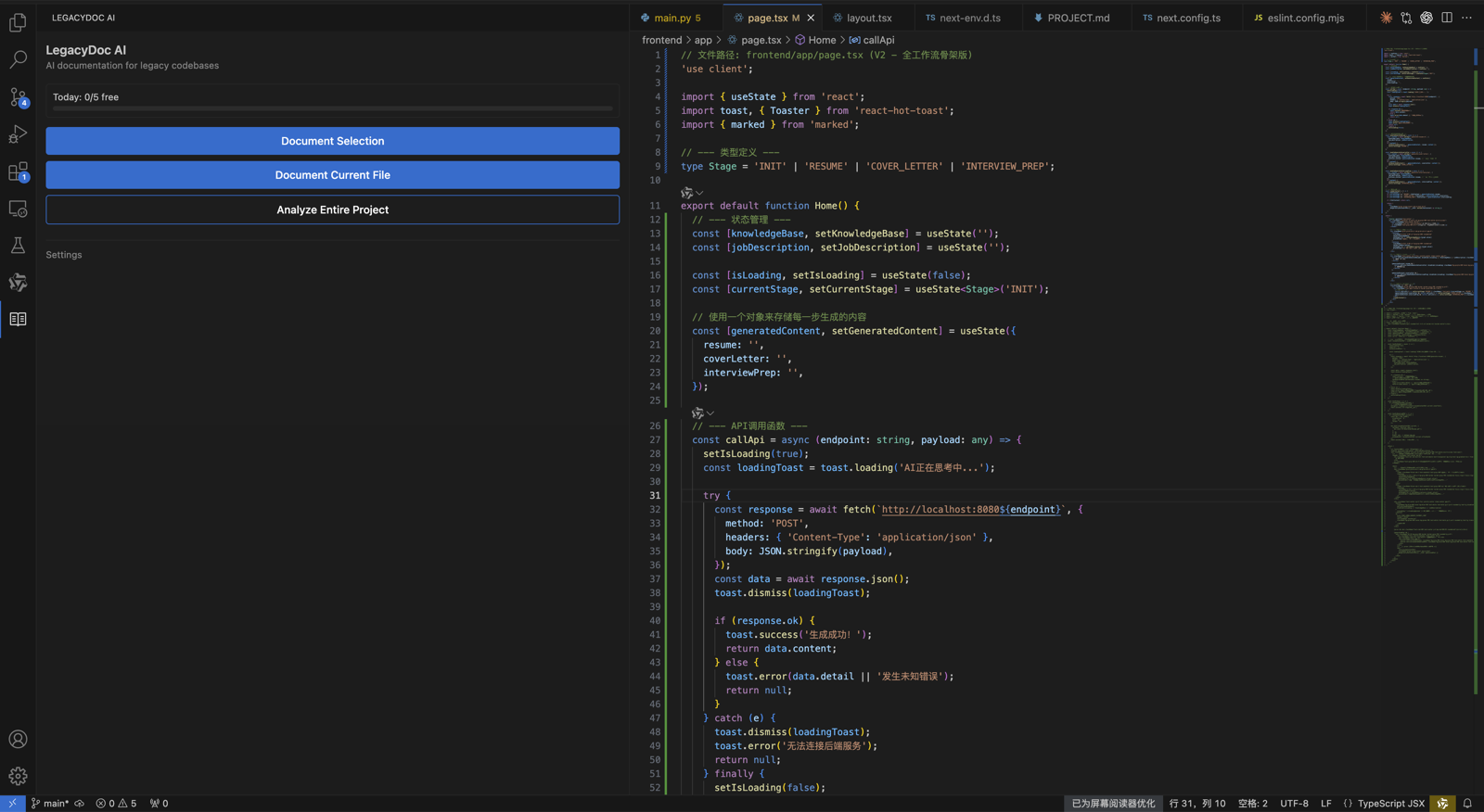
Your AI-generated app works — but is it ready to clean up, review, refactor, or ship? LegacyDoc AI turns your local codebase into an audit-ready context pack you can act on or share with any AI tool.
Use it to audit AI code before changing it: map the architecture, spot areas to inspect, document missing context, and turn messy cleanup into small reviewable steps.
Review handoff snapshot
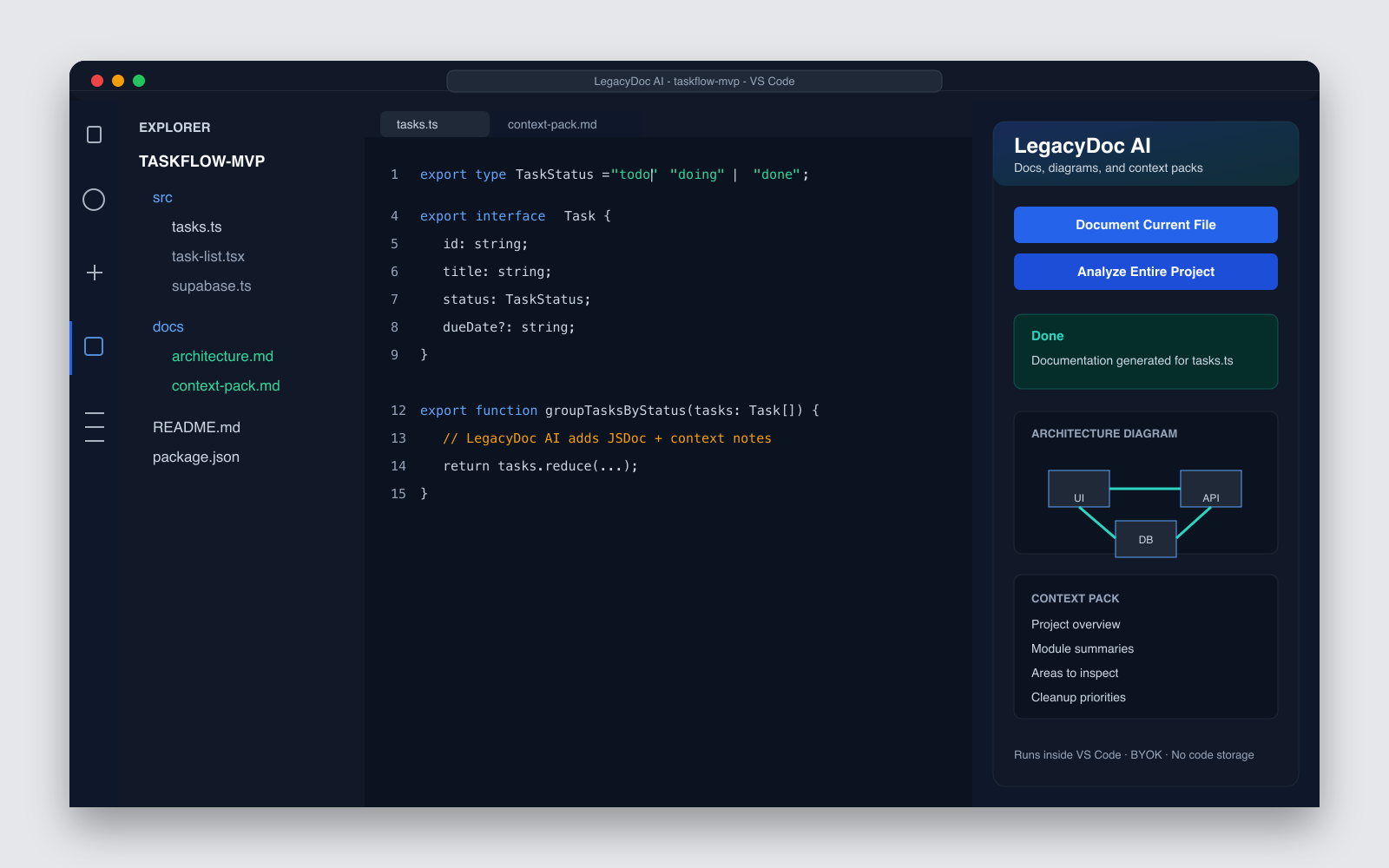
Audit focus
- Architecture map before cleanup
- Risky files and review boundaries
- Context pack for AI coding agents
Map
Audit
Handoff
Audit AI code locally
Run inside VS Code with your own AI provider key before sharing context with an AI agent.
Create a report humans can review
Turn architecture, modules, risk areas, and cleanup priorities into a readable handoff.
Give AI tools the right context
Share selected notes with Claude Code, Cursor, Codex, or a cleanup specialist.
When to use it
Audit AI code before cleanup, launch, or handoff.
The strongest time to audit AI code is before the next major change. Use the report when a prototype works, but you are not sure which files are safe to refactor, which generated assumptions are risky, or what a cleanup specialist should review first.
Audit AI code before refactor
Map modules and ownership before asking an agent to rewrite components.
Audit AI code before launch
Review auth, data flow, dependencies, and cleanup blockers before users see the app.
Audit AI code before handoff
Give a freelancer, teammate, or specialist a reviewed context pack instead of a vague repo link.
Audit readiness scorecard
Use one checklist when you audit AI code, not a loose prompt
Teams often try to audit AI code by asking a model to “review this repo.” That usually produces generic feedback. A stronger way to audit AI code is to collect the evidence first: architecture boundaries, risky files, generated assumptions, dependencies, missing docs, test gaps, and cleanup priorities. Then the human reviewer, specialist, or AI coding agent can work from the same context.
1. Architecture evidence
Before you audit AI code, identify the routes, modules, data flow, auth boundary, and ownership of key files. The audit should show where behavior lives before it judges code quality.
2. Risk evidence
When you audit AI code, flag risky generated assumptions: oversized components, duplicated helpers, mixed server/client logic, hidden environment variables, and unclear permissions.
3. Change evidence
A useful report should explain what can be changed safely. If you audit AI code before refactoring, separate tiny cleanup tasks from high-risk rewrites.
4. Launch evidence
If you audit AI code before launch, check setup instructions, dependency age, data handling, payment or auth paths, rollback notes, and the flows that must not break.
5. Handoff evidence
If you audit AI code before hiring help, prepare module summaries and cleanup priorities so the first paid hour is not spent reverse-engineering the project.
6. Verification evidence
After you audit AI code, write the commands, user flows, screenshots, and acceptance checks that prove the cleanup did not change expected behavior.
What counts as a good audit output?
A good report should let someone audit AI code without rereading the whole repository from scratch. It should explain what the app does, where important behavior lives, which parts are risky, what to inspect next, and which cleanup task should happen first. LegacyDoc AI is built for that first pass: audit AI code locally, turn the codebase into a readable context pack, and then decide whether to refactor yourself, ask an AI agent, or hand the project to a cleanup specialist. Teams that audit AI code this way get a clearer review path before changing production files.
Minimum bar: if another developer cannot audit AI code from the report and name the first three review tasks, the report is still too vague. Audit AI code again with a narrower scope before asking for a large rewrite.
Verification scope
What to verify when you audit AI-generated code
AI-generated code often looks coherent before the project is actually safe to change. A useful audit should make the hidden assumptions visible before refactor, launch, or handoff.
If you need to audit AI code, the first job is not to rewrite it. The first job is to make architecture, data flow, risky files, and cleanup priorities visible enough for a human or AI coding agent to review.
Architecture boundaries
Which modules own routing, state, data access, auth, and external services.
Generated assumptions
Where duplicated helpers, oversized components, or AI-created abstractions may hide behavior.
Risky flows
Auth, permissions, payments, user data, environment variables, and deployment config.
Review evidence
What a human, AI agent, or cleanup specialist should inspect before changing code.
LegacyDoc AI does not replace SAST, CI, dependency scanning, or a formal security audit. It prepares the missing project context: architecture maps, module summaries, areas to inspect, cleanup priorities, and handoff notes that make those checks easier to review.
Project overview
taskflow-mvp · Next.js 15 (App Router) · Supabase · Tailwind · 12k LOC · built with Cursor + Claude Code over 3 weekends. Working MVP, no tests, no docs.
Architecture map
app/
├── (auth)/        # sign in / sign up / forgot password
├── dashboard/
│   ├── tasks/     # CRUD + filters  ← largest surface
│   ├── projects/  # grouping
│   └── settings/  # preferences
├── api/
│   ├── tasks/route.ts
│   └── webhooks/
└── lib/
    ├── supabase.ts  # mixed server/client usage
    ├── auth.ts
    └── ai.ts        # behind feature flag
Areas to inspect
- app/api/tasks/route.ts — input parsing
- lib/supabase.ts — server/client boundary
- TaskList.tsx — 380 lines, split candidate
- lib/ai.ts — feature flag + timeout
- next.config.mjs — env loading & image domains
Cleanup priorities
- Split TaskList into TaskList + TaskRow + TaskFilters
- Move DB-only code to server modules
- Unified API input parsing helper
- Add JSDoc to public exports in lib/*
- Document required env vars in README
AI review notes
Use this context pack with Claude Code / Cursor / Codex.
Suggested prompt:
  "Use the architecture map and module summaries below
   as project context. Help me split TaskList.tsx into
   smaller components without changing behavior."
Sample format only — not a real customer report and not a security audit.
Open the full example reportThe problem with vibe-coded apps
Six recurring patterns that make AI-generated codebases hard to clean up safely.
Hidden architecture debt
No one documented how modules connect or why decisions were made.
Duplicated logic
AI tools often generate similar code in multiple places without noticing.
Missing docs
Functions, APIs, and configs have no explanation for the next person.
Unclear module ownership
Hard to tell what each folder does or which parts are safe to change.
Risky dependencies
Outdated packages, insecure configs, or unused code hiding in plain sight.
No cleanup plan
You know it needs work, but don't know where to start or what's safe.
Why vibe code cleanup starts with an audit
Before you clean up, refactor, hand off to a freelancer, or let another AI agent touch the code — you need context. Without it, cleanup is guesswork: you might break working logic, miss the riskiest areas, or spend hours on the wrong files.
An audit-ready context pack gives you (and any AI tool or developer you work with) a shared understanding of the architecture, risk areas, missing documentation, and cleanup priorities — before a single line changes.
What the audit-ready context pack includes
How to use it
-
01
Open your project locally in VS Code.
-
02
Run LegacyDoc AI from the sidebar.
-
03
Review the generated context pack and report.
-
04
Share selected context with Claude Code, Cursor, Codex, or a cleanup specialist.
-
05
Plan small, reviewable cleanup and refactor steps.
When to use this report
Before hiring a vibe code cleanup specialist
Hand them a context pack so they can start immediately instead of spending hours onboarding.
Before asking Claude Code, Cursor, or Codex to refactor
Give the AI tool architecture context so suggestions don't break unrelated parts of the app.
Before shipping an AI-generated MVP
Identify documentation gaps, oversized files, and areas to inspect before launch.
Before handing off to a developer
Reduce onboarding time with a clear architecture map, module summaries, and cleanup priorities.
Vibe code audit
Run a vibe code audit before cleanup services touch the app.
A vibe code audit is the first pass you run when an AI-built product works, but the codebase is hard to trust. It helps you audit AI code before a cleanup specialist, freelancer, or AI coding agent starts editing files.
Use the report to audit AI code for architecture, generated assumptions, risky flows, and verification notes. Then send the context pack with your cleanup brief instead of asking someone to discover the whole project from a cold repository link.
Before quote prep
Audit AI code first so the cleanup quote can focus on risky flows and scope, not basic discovery.
Before broad refactor
A vibe code audit separates safe cleanup slices from rewrites that could break auth, payment, data, or deployment paths.
Before AI agent work
Give Claude Code, Cursor, Codex, or Copilot a reviewed context pack before asking for structural edits.
Before launch review
Check setup, dependencies, data writes, rollback notes, and proof that core user flows still work.
AI code audit vs security audit vs code review
An AI code audit report is the foundation for cleanup and review — not a replacement for a formal security audit.
| Type | What it produces | Who does it |
|---|---|---|
| AI code audit report | Context pack, architecture map, module summaries, cleanup priorities | LegacyDoc AI generates locally; you (or an AI tool) review |
| Security audit | Vulnerability findings, penetration test results, formal security report | Professional security firm or security engineer |
| Code review | Line-level feedback, refactor suggestions, approval/changes | Developer or team peer review |
What to do after the report
-
01
Fix documentation gaps — add missing JSDoc, README, and inline comments.
-
02
Split oversized files into smaller, single-responsibility modules.
-
03
Review environment variable and configuration usage for clarity.
-
04
Create small, reviewable refactor tasks instead of one big rewrite.
-
05
Share the context pack with Claude Code, Cursor, or Codex to guide cleanup.
What it is
A locally-generated context pack with architecture map, module summaries, areas to inspect, and cleanup priorities — designed to be shared with AI tools or human reviewers.
What it's not
- — It does not replace a professional security audit.
- — It does not automatically fix every issue in your codebase.
- — It does not guarantee production readiness.
FAQ
What is an AI code audit?
An AI code audit is a structured review of AI-generated or vibe-coded projects to identify architecture issues, missing documentation, areas to inspect, and cleanup priorities — before you start making changes. It is a form of AI codebase audit focused on understanding and preparing the code.
How do I audit AI code before refactoring or launch?
Start by mapping the project architecture, identifying risky or complex areas, checking missing documentation, and turning that into a small cleanup plan. LegacyDoc AI generates that audit-ready context pack inside VS Code so you can review it before changing code.
What should I verify when I audit AI-generated code?
Verify architecture boundaries, auth and permission assumptions, data flow, secrets handling, generated dependencies, oversized files, missing tests, and whether the cleanup plan can be split into small reviewable tasks.
What is a vibe code audit?
A vibe code audit is a practical review of an AI-built or vibe-coded app before cleanup, refactor, launch, or handoff. It maps the architecture, risky flows, generated assumptions, and verification steps so you can audit AI code before changing it.
Is this the same as a security audit?
No. LegacyDoc AI generates a context pack and cleanup checklist. It does not perform penetration testing, vulnerability scanning, or formal security certification.
Does this replace SAST, CI, or security scanners?
No. Use static analysis, CI checks, dependency scanners, and security tools for enforcement. LegacyDoc AI helps humans and AI coding agents understand the codebase, locate review areas, and prepare the context those tools do not explain.
Can this clean up my vibe-coded app automatically?
No. It generates an audit-ready report so you (or an AI tool) can make informed cleanup decisions. It does not rewrite or modify your code.
How is this different from hiring a vibe code cleanup specialist?
A specialist does the cleanup work. LegacyDoc AI prepares the context pack that makes that work faster and more focused — whether you do it yourself or hire someone. If you are looking for a vibe code cleanup specialist, generating a context pack first lets the handoff go much faster.
Can I use the report with Claude Code, Cursor, Codex, or Copilot?
Yes. The generated context files are designed to be shared with AI coding tools so they can understand your project without you having to explain everything from scratch.
How does this relate to AI-generated code review?
The context pack is the foundation for AI-generated code review. With architecture maps, module summaries, and an AI code verification checklist, you (or an AI tool) can review code with full project context instead of guessing.
Does LegacyDoc AI upload my code?
No. LegacyDoc AI runs inside VS Code. Your code is sent directly to the AI provider you configure, not to RomantiCode servers. You bring your own API key (BYOK).
What kinds of projects work best?
Any local codebase in VS Code — especially AI-generated apps, vibe-coded prototypes, inherited projects, or legacy codebases that lack documentation.
Related resources
Service
AI App Launch Audit
Request a launch-readiness audit before real users, cleanup services, or handoff.
Tool
AI Code Audit Cost Calculator
Estimate discovery hours, report scope, and review budget before asking for an audit quote.
Tool
LLM Cost Regression Checker
Check whether new agent workflows, retries, or model choices create recurring LLM cost growth.
Use case
AI Codebase Context Map
Create the codebase map, architecture notes, and project context before asking AI to audit or change code.
Tool
CodeGraph Token Savings Calculator
Compare code graph workflows with audit reports when coding agents need repeatable project context.
Example
Example Report
See a sample AI code audit report for an AI-generated app.
Template
AI Code Audit Report Template
Copy the report structure before generating or editing a cleanup handoff.
Use case
Vibe Code Cleanup Readiness
Prepare your app for cleanup before hiring a specialist or refactoring with AI.
Resource
AI Code Audit Checklist
A practical checklist to review architecture, docs, and cleanup priorities.
Resource
Production Ready Checklist
Review an AI-built app before launch: auth, data flow, QA, rollback, and cleanup priorities.
Audit your vibe-coded app
Runs inside VS Code. BYOK. No code storage or proxying by RomantiCode.
audit AI code decision checklist
This section keeps audit AI code focused on one search intent. A reader comparing options for audit AI code should quickly see the task, the evidence, the handoff value, and the next action without leaving the page.
audit AI code checkpoint 1
Use audit AI code as the page promise, then verify that audit AI code is supported by the headline, the example, the internal links, the call to action, and the reader's next step. A strong audit AI code page should explain who needs audit AI code, what evidence is required before acting, and how RomantiCode reduces uncertainty for founders, developers, cleanup specialists, and AI coding agents. Keep the audit AI code checklist tied to a real workflow: inspect the codebase, map risky files, prepare context, compare options, and decide whether to audit, refactor, hire help, or continue with an AI assistant.
audit AI code checkpoint 2
Use audit AI code as the page promise, then verify that audit AI code is supported by the headline, the example, the internal links, the call to action, and the reader's next step. A strong audit AI code page should explain who needs audit AI code, what evidence is required before acting, and how RomantiCode reduces uncertainty for founders, developers, cleanup specialists, and AI coding agents. Keep the audit AI code checklist tied to a real workflow: inspect the codebase, map risky files, prepare context, compare options, and decide whether to audit, refactor, hire help, or continue with an AI assistant.
audit AI code checkpoint 3
Use audit AI code as the page promise, then verify that audit AI code is supported by the headline, the example, the internal links, the call to action, and the reader's next step. A strong audit AI code page should explain who needs audit AI code, what evidence is required before acting, and how RomantiCode reduces uncertainty for founders, developers, cleanup specialists, and AI coding agents. Keep the audit AI code checklist tied to a real workflow: inspect the codebase, map risky files, prepare context, compare options, and decide whether to audit, refactor, hire help, or continue with an AI assistant.
audit AI code checkpoint 4
Use audit AI code as the page promise, then verify that audit AI code is supported by the headline, the example, the internal links, the call to action, and the reader's next step. A strong audit AI code page should explain who needs audit AI code, what evidence is required before acting, and how RomantiCode reduces uncertainty for founders, developers, cleanup specialists, and AI coding agents. Keep the audit AI code checklist tied to a real workflow: inspect the codebase, map risky files, prepare context, compare options, and decide whether to audit, refactor, hire help, or continue with an AI assistant.
audit AI code checkpoint 5
Use audit AI code as the page promise, then verify that audit AI code is supported by the headline, the example, the internal links, the call to action, and the reader's next step. A strong audit AI code page should explain who needs audit AI code, what evidence is required before acting, and how RomantiCode reduces uncertainty for founders, developers, cleanup specialists, and AI coding agents. Keep the audit AI code checklist tied to a real workflow: inspect the codebase, map risky files, prepare context, compare options, and decide whether to audit, refactor, hire help, or continue with an AI assistant.
audit AI code checkpoint 6
Use audit AI code as the page promise, then verify that audit AI code is supported by the headline, the example, the internal links, the call to action, and the reader's next step. A strong audit AI code page should explain who needs audit AI code, what evidence is required before acting, and how RomantiCode reduces uncertainty for founders, developers, cleanup specialists, and AI coding agents. Keep the audit AI code checklist tied to a real workflow: inspect the codebase, map risky files, prepare context, compare options, and decide whether to audit, refactor, hire help, or continue with an AI assistant.
audit AI code checkpoint 7
Use audit AI code as the page promise, then verify that audit AI code is supported by the headline, the example, the internal links, the call to action, and the reader's next step. A strong audit AI code page should explain who needs audit AI code, what evidence is required before acting, and how RomantiCode reduces uncertainty for founders, developers, cleanup specialists, and AI coding agents. Keep the audit AI code checklist tied to a real workflow: inspect the codebase, map risky files, prepare context, compare options, and decide whether to audit, refactor, hire help, or continue with an AI assistant.
audit AI code checkpoint 8
Use audit AI code as the page promise, then verify that audit AI code is supported by the headline, the example, the internal links, the call to action, and the reader's next step. A strong audit AI code page should explain who needs audit AI code, what evidence is required before acting, and how RomantiCode reduces uncertainty for founders, developers, cleanup specialists, and AI coding agents. Keep the audit AI code checklist tied to a real workflow: inspect the codebase, map risky files, prepare context, compare options, and decide whether to audit, refactor, hire help, or continue with an AI assistant.
audit AI code checkpoint 9
Use audit AI code as the page promise, then verify that audit AI code is supported by the headline, the example, the internal links, the call to action, and the reader's next step. A strong audit AI code page should explain who needs audit AI code, what evidence is required before acting, and how RomantiCode reduces uncertainty for founders, developers, cleanup specialists, and AI coding agents. Keep the audit AI code checklist tied to a real workflow: inspect the codebase, map risky files, prepare context, compare options, and decide whether to audit, refactor, hire help, or continue with an AI assistant.
audit AI code checkpoint 10
Use audit AI code as the page promise, then verify that audit AI code is supported by the headline, the example, the internal links, the call to action, and the reader's next step. A strong audit AI code page should explain who needs audit AI code, what evidence is required before acting, and how RomantiCode reduces uncertainty for founders, developers, cleanup specialists, and AI coding agents. Keep the audit AI code checklist tied to a real workflow: inspect the codebase, map risky files, prepare context, compare options, and decide whether to audit, refactor, hire help, or continue with an AI assistant.
audit AI code checkpoint 11
Use audit AI code as the page promise, then verify that audit AI code is supported by the headline, the example, the internal links, the call to action, and the reader's next step. A strong audit AI code page should explain who needs audit AI code, what evidence is required before acting, and how RomantiCode reduces uncertainty for founders, developers, cleanup specialists, and AI coding agents. Keep the audit AI code checklist tied to a real workflow: inspect the codebase, map risky files, prepare context, compare options, and decide whether to audit, refactor, hire help, or continue with an AI assistant.
audit AI code checkpoint 12
Use audit AI code as the page promise, then verify that audit AI code is supported by the headline, the example, the internal links, the call to action, and the reader's next step. A strong audit AI code page should explain who needs audit AI code, what evidence is required before acting, and how RomantiCode reduces uncertainty for founders, developers, cleanup specialists, and AI coding agents. Keep the audit AI code checklist tied to a real workflow: inspect the codebase, map risky files, prepare context, compare options, and decide whether to audit, refactor, hire help, or continue with an AI assistant.
audit AI code checkpoint 13
Use audit AI code as the page promise, then verify that audit AI code is supported by the headline, the example, the internal links, the call to action, and the reader's next step. A strong audit AI code page should explain who needs audit AI code, what evidence is required before acting, and how RomantiCode reduces uncertainty for founders, developers, cleanup specialists, and AI coding agents. Keep the audit AI code checklist tied to a real workflow: inspect the codebase, map risky files, prepare context, compare options, and decide whether to audit, refactor, hire help, or continue with an AI assistant.
audit AI code checkpoint 14
Use audit AI code as the page promise, then verify that audit AI code is supported by the headline, the example, the internal links, the call to action, and the reader's next step. A strong audit AI code page should explain who needs audit AI code, what evidence is required before acting, and how RomantiCode reduces uncertainty for founders, developers, cleanup specialists, and AI coding agents. Keep the audit AI code checklist tied to a real workflow: inspect the codebase, map risky files, prepare context, compare options, and decide whether to audit, refactor, hire help, or continue with an AI assistant.
audit AI code checkpoint 15
Use audit AI code as the page promise, then verify that audit AI code is supported by the headline, the example, the internal links, the call to action, and the reader's next step. A strong audit AI code page should explain who needs audit AI code, what evidence is required before acting, and how RomantiCode reduces uncertainty for founders, developers, cleanup specialists, and AI coding agents. Keep the audit AI code checklist tied to a real workflow: inspect the codebase, map risky files, prepare context, compare options, and decide whether to audit, refactor, hire help, or continue with an AI assistant.
audit AI code checkpoint 16
Use audit AI code as the page promise, then verify that audit AI code is supported by the headline, the example, the internal links, the call to action, and the reader's next step. A strong audit AI code page should explain who needs audit AI code, what evidence is required before acting, and how RomantiCode reduces uncertainty for founders, developers, cleanup specialists, and AI coding agents. Keep the audit AI code checklist tied to a real workflow: inspect the codebase, map risky files, prepare context, compare options, and decide whether to audit, refactor, hire help, or continue with an AI assistant.
audit AI code checkpoint 17
Use audit AI code as the page promise, then verify that audit AI code is supported by the headline, the example, the internal links, the call to action, and the reader's next step. A strong audit AI code page should explain who needs audit AI code, what evidence is required before acting, and how RomantiCode reduces uncertainty for founders, developers, cleanup specialists, and AI coding agents. Keep the audit AI code checklist tied to a real workflow: inspect the codebase, map risky files, prepare context, compare options, and decide whether to audit, refactor, hire help, or continue with an AI assistant.
audit AI code checkpoint 18
Use audit AI code as the page promise, then verify that audit AI code is supported by the headline, the example, the internal links, the call to action, and the reader's next step. A strong audit AI code page should explain who needs audit AI code, what evidence is required before acting, and how RomantiCode reduces uncertainty for founders, developers, cleanup specialists, and AI coding agents. Keep the audit AI code checklist tied to a real workflow: inspect the codebase, map risky files, prepare context, compare options, and decide whether to audit, refactor, hire help, or continue with an AI assistant.
audit AI code checkpoint 19
Use audit AI code as the page promise, then verify that audit AI code is supported by the headline, the example, the internal links, the call to action, and the reader's next step. A strong audit AI code page should explain who needs audit AI code, what evidence is required before acting, and how RomantiCode reduces uncertainty for founders, developers, cleanup specialists, and AI coding agents. Keep the audit AI code checklist tied to a real workflow: inspect the codebase, map risky files, prepare context, compare options, and decide whether to audit, refactor, hire help, or continue with an AI assistant.
audit AI code checkpoint 20
Use audit AI code as the page promise, then verify that audit AI code is supported by the headline, the example, the internal links, the call to action, and the reader's next step. A strong audit AI code page should explain who needs audit AI code, what evidence is required before acting, and how RomantiCode reduces uncertainty for founders, developers, cleanup specialists, and AI coding agents. Keep the audit AI code checklist tied to a real workflow: inspect the codebase, map risky files, prepare context, compare options, and decide whether to audit, refactor, hire help, or continue with an AI assistant.
audit AI code checkpoint 21
Use audit AI code as the page promise, then verify that audit AI code is supported by the headline, the example, the internal links, the call to action, and the reader's next step. A strong audit AI code page should explain who needs audit AI code, what evidence is required before acting, and how RomantiCode reduces uncertainty for founders, developers, cleanup specialists, and AI coding agents. Keep the audit AI code checklist tied to a real workflow: inspect the codebase, map risky files, prepare context, compare options, and decide whether to audit, refactor, hire help, or continue with an AI assistant.
audit AI code checkpoint 22
Use audit AI code as the page promise, then verify that audit AI code is supported by the headline, the example, the internal links, the call to action, and the reader's next step. A strong audit AI code page should explain who needs audit AI code, what evidence is required before acting, and how RomantiCode reduces uncertainty for founders, developers, cleanup specialists, and AI coding agents. Keep the audit AI code checklist tied to a real workflow: inspect the codebase, map risky files, prepare context, compare options, and decide whether to audit, refactor, hire help, or continue with an AI assistant.
audit AI code checkpoint 23
Use audit AI code as the page promise, then verify that audit AI code is supported by the headline, the example, the internal links, the call to action, and the reader's next step. A strong audit AI code page should explain who needs audit AI code, what evidence is required before acting, and how RomantiCode reduces uncertainty for founders, developers, cleanup specialists, and AI coding agents. Keep the audit AI code checklist tied to a real workflow: inspect the codebase, map risky files, prepare context, compare options, and decide whether to audit, refactor, hire help, or continue with an AI assistant.
audit AI code checkpoint 24
Use audit AI code as the page promise, then verify that audit AI code is supported by the headline, the example, the internal links, the call to action, and the reader's next step. A strong audit AI code page should explain who needs audit AI code, what evidence is required before acting, and how RomantiCode reduces uncertainty for founders, developers, cleanup specialists, and AI coding agents. Keep the audit AI code checklist tied to a real workflow: inspect the codebase, map risky files, prepare context, compare options, and decide whether to audit, refactor, hire help, or continue with an AI assistant.
audit AI code checkpoint 25
Use audit AI code as the page promise, then verify that audit AI code is supported by the headline, the example, the internal links, the call to action, and the reader's next step. A strong audit AI code page should explain who needs audit AI code, what evidence is required before acting, and how RomantiCode reduces uncertainty for founders, developers, cleanup specialists, and AI coding agents. Keep the audit AI code checklist tied to a real workflow: inspect the codebase, map risky files, prepare context, compare options, and decide whether to audit, refactor, hire help, or continue with an AI assistant.
audit AI code checkpoint 26
Use audit AI code as the page promise, then verify that audit AI code is supported by the headline, the example, the internal links, the call to action, and the reader's next step. A strong audit AI code page should explain who needs audit AI code, what evidence is required before acting, and how RomantiCode reduces uncertainty for founders, developers, cleanup specialists, and AI coding agents. Keep the audit AI code checklist tied to a real workflow: inspect the codebase, map risky files, prepare context, compare options, and decide whether to audit, refactor, hire help, or continue with an AI assistant.
audit AI code checkpoint 27
Use audit AI code as the page promise, then verify that audit AI code is supported by the headline, the example, the internal links, the call to action, and the reader's next step. A strong audit AI code page should explain who needs audit AI code, what evidence is required before acting, and how RomantiCode reduces uncertainty for founders, developers, cleanup specialists, and AI coding agents. Keep the audit AI code checklist tied to a real workflow: inspect the codebase, map risky files, prepare context, compare options, and decide whether to audit, refactor, hire help, or continue with an AI assistant.
audit AI code checkpoint 28
Use audit AI code as the page promise, then verify that audit AI code is supported by the headline, the example, the internal links, the call to action, and the reader's next step. A strong audit AI code page should explain who needs audit AI code, what evidence is required before acting, and how RomantiCode reduces uncertainty for founders, developers, cleanup specialists, and AI coding agents. Keep the audit AI code checklist tied to a real workflow: inspect the codebase, map risky files, prepare context, compare options, and decide whether to audit, refactor, hire help, or continue with an AI assistant.
audit AI code checkpoint 29
Use audit AI code as the page promise, then verify that audit AI code is supported by the headline, the example, the internal links, the call to action, and the reader's next step. A strong audit AI code page should explain who needs audit AI code, what evidence is required before acting, and how RomantiCode reduces uncertainty for founders, developers, cleanup specialists, and AI coding agents. Keep the audit AI code checklist tied to a real workflow: inspect the codebase, map risky files, prepare context, compare options, and decide whether to audit, refactor, hire help, or continue with an AI assistant.
audit AI code checkpoint 30
Use audit AI code as the page promise, then verify that audit AI code is supported by the headline, the example, the internal links, the call to action, and the reader's next step. A strong audit AI code page should explain who needs audit AI code, what evidence is required before acting, and how RomantiCode reduces uncertainty for founders, developers, cleanup specialists, and AI coding agents. Keep the audit AI code checklist tied to a real workflow: inspect the codebase, map risky files, prepare context, compare options, and decide whether to audit, refactor, hire help, or continue with an AI assistant.
audit AI code checkpoint 31
Use audit AI code as the page promise, then verify that audit AI code is supported by the headline, the example, the internal links, the call to action, and the reader's next step. A strong audit AI code page should explain who needs audit AI code, what evidence is required before acting, and how RomantiCode reduces uncertainty for founders, developers, cleanup specialists, and AI coding agents. Keep the audit AI code checklist tied to a real workflow: inspect the codebase, map risky files, prepare context, compare options, and decide whether to audit, refactor, hire help, or continue with an AI assistant.
audit AI code checkpoint 32
Use audit AI code as the page promise, then verify that audit AI code is supported by the headline, the example, the internal links, the call to action, and the reader's next step. A strong audit AI code page should explain who needs audit AI code, what evidence is required before acting, and how RomantiCode reduces uncertainty for founders, developers, cleanup specialists, and AI coding agents. Keep the audit AI code checklist tied to a real workflow: inspect the codebase, map risky files, prepare context, compare options, and decide whether to audit, refactor, hire help, or continue with an AI assistant.
audit AI code checkpoint 33
Use audit AI code as the page promise, then verify that audit AI code is supported by the headline, the example, the internal links, the call to action, and the reader's next step. A strong audit AI code page should explain who needs audit AI code, what evidence is required before acting, and how RomantiCode reduces uncertainty for founders, developers, cleanup specialists, and AI coding agents. Keep the audit AI code checklist tied to a real workflow: inspect the codebase, map risky files, prepare context, compare options, and decide whether to audit, refactor, hire help, or continue with an AI assistant.
audit AI code checkpoint 34
Use audit AI code as the page promise, then verify that audit AI code is supported by the headline, the example, the internal links, the call to action, and the reader's next step. A strong audit AI code page should explain who needs audit AI code, what evidence is required before acting, and how RomantiCode reduces uncertainty for founders, developers, cleanup specialists, and AI coding agents. Keep the audit AI code checklist tied to a real workflow: inspect the codebase, map risky files, prepare context, compare options, and decide whether to audit, refactor, hire help, or continue with an AI assistant.
audit AI code checkpoint 35
Use audit AI code as the page promise, then verify that audit AI code is supported by the headline, the example, the internal links, the call to action, and the reader's next step. A strong audit AI code page should explain who needs audit AI code, what evidence is required before acting, and how RomantiCode reduces uncertainty for founders, developers, cleanup specialists, and AI coding agents. Keep the audit AI code checklist tied to a real workflow: inspect the codebase, map risky files, prepare context, compare options, and decide whether to audit, refactor, hire help, or continue with an AI assistant.
audit AI code checkpoint 36
Use audit AI code as the page promise, then verify that audit AI code is supported by the headline, the example, the internal links, the call to action, and the reader's next step. A strong audit AI code page should explain who needs audit AI code, what evidence is required before acting, and how RomantiCode reduces uncertainty for founders, developers, cleanup specialists, and AI coding agents. Keep the audit AI code checklist tied to a real workflow: inspect the codebase, map risky files, prepare context, compare options, and decide whether to audit, refactor, hire help, or continue with an AI assistant.
audit AI code checkpoint 37
Use audit AI code as the page promise, then verify that audit AI code is supported by the headline, the example, the internal links, the call to action, and the reader's next step. A strong audit AI code page should explain who needs audit AI code, what evidence is required before acting, and how RomantiCode reduces uncertainty for founders, developers, cleanup specialists, and AI coding agents. Keep the audit AI code checklist tied to a real workflow: inspect the codebase, map risky files, prepare context, compare options, and decide whether to audit, refactor, hire help, or continue with an AI assistant.
audit AI code checkpoint 38
Use audit AI code as the page promise, then verify that audit AI code is supported by the headline, the example, the internal links, the call to action, and the reader's next step. A strong audit AI code page should explain who needs audit AI code, what evidence is required before acting, and how RomantiCode reduces uncertainty for founders, developers, cleanup specialists, and AI coding agents. Keep the audit AI code checklist tied to a real workflow: inspect the codebase, map risky files, prepare context, compare options, and decide whether to audit, refactor, hire help, or continue with an AI assistant.
audit AI code checkpoint 39
Use audit AI code as the page promise, then verify that audit AI code is supported by the headline, the example, the internal links, the call to action, and the reader's next step. A strong audit AI code page should explain who needs audit AI code, what evidence is required before acting, and how RomantiCode reduces uncertainty for founders, developers, cleanup specialists, and AI coding agents. Keep the audit AI code checklist tied to a real workflow: inspect the codebase, map risky files, prepare context, compare options, and decide whether to audit, refactor, hire help, or continue with an AI assistant.
audit AI code checkpoint 40
Use audit AI code as the page promise, then verify that audit AI code is supported by the headline, the example, the internal links, the call to action, and the reader's next step. A strong audit AI code page should explain who needs audit AI code, what evidence is required before acting, and how RomantiCode reduces uncertainty for founders, developers, cleanup specialists, and AI coding agents. Keep the audit AI code checklist tied to a real workflow: inspect the codebase, map risky files, prepare context, compare options, and decide whether to audit, refactor, hire help, or continue with an AI assistant.
audit AI code checkpoint 41
Use audit AI code as the page promise, then verify that audit AI code is supported by the headline, the example, the internal links, the call to action, and the reader's next step. A strong audit AI code page should explain who needs audit AI code, what evidence is required before acting, and how RomantiCode reduces uncertainty for founders, developers, cleanup specialists, and AI coding agents. Keep the audit AI code checklist tied to a real workflow: inspect the codebase, map risky files, prepare context, compare options, and decide whether to audit, refactor, hire help, or continue with an AI assistant.
audit AI code checkpoint 42
Use audit AI code as the page promise, then verify that audit AI code is supported by the headline, the example, the internal links, the call to action, and the reader's next step. A strong audit AI code page should explain who needs audit AI code, what evidence is required before acting, and how RomantiCode reduces uncertainty for founders, developers, cleanup specialists, and AI coding agents. Keep the audit AI code checklist tied to a real workflow: inspect the codebase, map risky files, prepare context, compare options, and decide whether to audit, refactor, hire help, or continue with an AI assistant.
audit AI code checkpoint 43
Use audit AI code as the page promise, then verify that audit AI code is supported by the headline, the example, the internal links, the call to action, and the reader's next step. A strong audit AI code page should explain who needs audit AI code, what evidence is required before acting, and how RomantiCode reduces uncertainty for founders, developers, cleanup specialists, and AI coding agents. Keep the audit AI code checklist tied to a real workflow: inspect the codebase, map risky files, prepare context, compare options, and decide whether to audit, refactor, hire help, or continue with an AI assistant.
audit AI code checkpoint 44
Use audit AI code as the page promise, then verify that audit AI code is supported by the headline, the example, the internal links, the call to action, and the reader's next step. A strong audit AI code page should explain who needs audit AI code, what evidence is required before acting, and how RomantiCode reduces uncertainty for founders, developers, cleanup specialists, and AI coding agents. Keep the audit AI code checklist tied to a real workflow: inspect the codebase, map risky files, prepare context, compare options, and decide whether to audit, refactor, hire help, or continue with an AI assistant.
audit AI code checkpoint 45
Use audit AI code as the page promise, then verify that audit AI code is supported by the headline, the example, the internal links, the call to action, and the reader's next step. A strong audit AI code page should explain who needs audit AI code, what evidence is required before acting, and how RomantiCode reduces uncertainty for founders, developers, cleanup specialists, and AI coding agents. Keep the audit AI code checklist tied to a real workflow: inspect the codebase, map risky files, prepare context, compare options, and decide whether to audit, refactor, hire help, or continue with an AI assistant.
audit AI code checkpoint 46
Use audit AI code as the page promise, then verify that audit AI code is supported by the headline, the example, the internal links, the call to action, and the reader's next step. A strong audit AI code page should explain who needs audit AI code, what evidence is required before acting, and how RomantiCode reduces uncertainty for founders, developers, cleanup specialists, and AI coding agents. Keep the audit AI code checklist tied to a real workflow: inspect the codebase, map risky files, prepare context, compare options, and decide whether to audit, refactor, hire help, or continue with an AI assistant.
audit AI code checkpoint 47
Use audit AI code as the page promise, then verify that audit AI code is supported by the headline, the example, the internal links, the call to action, and the reader's next step. A strong audit AI code page should explain who needs audit AI code, what evidence is required before acting, and how RomantiCode reduces uncertainty for founders, developers, cleanup specialists, and AI coding agents. Keep the audit AI code checklist tied to a real workflow: inspect the codebase, map risky files, prepare context, compare options, and decide whether to audit, refactor, hire help, or continue with an AI assistant.
audit AI code checkpoint 48
Use audit AI code as the page promise, then verify that audit AI code is supported by the headline, the example, the internal links, the call to action, and the reader's next step. A strong audit AI code page should explain who needs audit AI code, what evidence is required before acting, and how RomantiCode reduces uncertainty for founders, developers, cleanup specialists, and AI coding agents. Keep the audit AI code checklist tied to a real workflow: inspect the codebase, map risky files, prepare context, compare options, and decide whether to audit, refactor, hire help, or continue with an AI assistant.
audit AI code checkpoint 49
Use audit AI code as the page promise, then verify that audit AI code is supported by the headline, the example, the internal links, the call to action, and the reader's next step. A strong audit AI code page should explain who needs audit AI code, what evidence is required before acting, and how RomantiCode reduces uncertainty for founders, developers, cleanup specialists, and AI coding agents. Keep the audit AI code checklist tied to a real workflow: inspect the codebase, map risky files, prepare context, compare options, and decide whether to audit, refactor, hire help, or continue with an AI assistant.
audit AI code checkpoint 50
Use audit AI code as the page promise, then verify that audit AI code is supported by the headline, the example, the internal links, the call to action, and the reader's next step. A strong audit AI code page should explain who needs audit AI code, what evidence is required before acting, and how RomantiCode reduces uncertainty for founders, developers, cleanup specialists, and AI coding agents. Keep the audit AI code checklist tied to a real workflow: inspect the codebase, map risky files, prepare context, compare options, and decide whether to audit, refactor, hire help, or continue with an AI assistant.
audit AI code checkpoint 51
Use audit AI code as the page promise, then verify that audit AI code is supported by the headline, the example, the internal links, the call to action, and the reader's next step. A strong audit AI code page should explain who needs audit AI code, what evidence is required before acting, and how RomantiCode reduces uncertainty for founders, developers, cleanup specialists, and AI coding agents. Keep the audit AI code checklist tied to a real workflow: inspect the codebase, map risky files, prepare context, compare options, and decide whether to audit, refactor, hire help, or continue with an AI assistant.
audit AI code checkpoint 52
Use audit AI code as the page promise, then verify that audit AI code is supported by the headline, the example, the internal links, the call to action, and the reader's next step. A strong audit AI code page should explain who needs audit AI code, what evidence is required before acting, and how RomantiCode reduces uncertainty for founders, developers, cleanup specialists, and AI coding agents. Keep the audit AI code checklist tied to a real workflow: inspect the codebase, map risky files, prepare context, compare options, and decide whether to audit, refactor, hire help, or continue with an AI assistant.