AI Code Audit Report Example for an AI-generated app.
Below is a sample AI code audit report example produced for a fictional vibe-coded SaaS app.
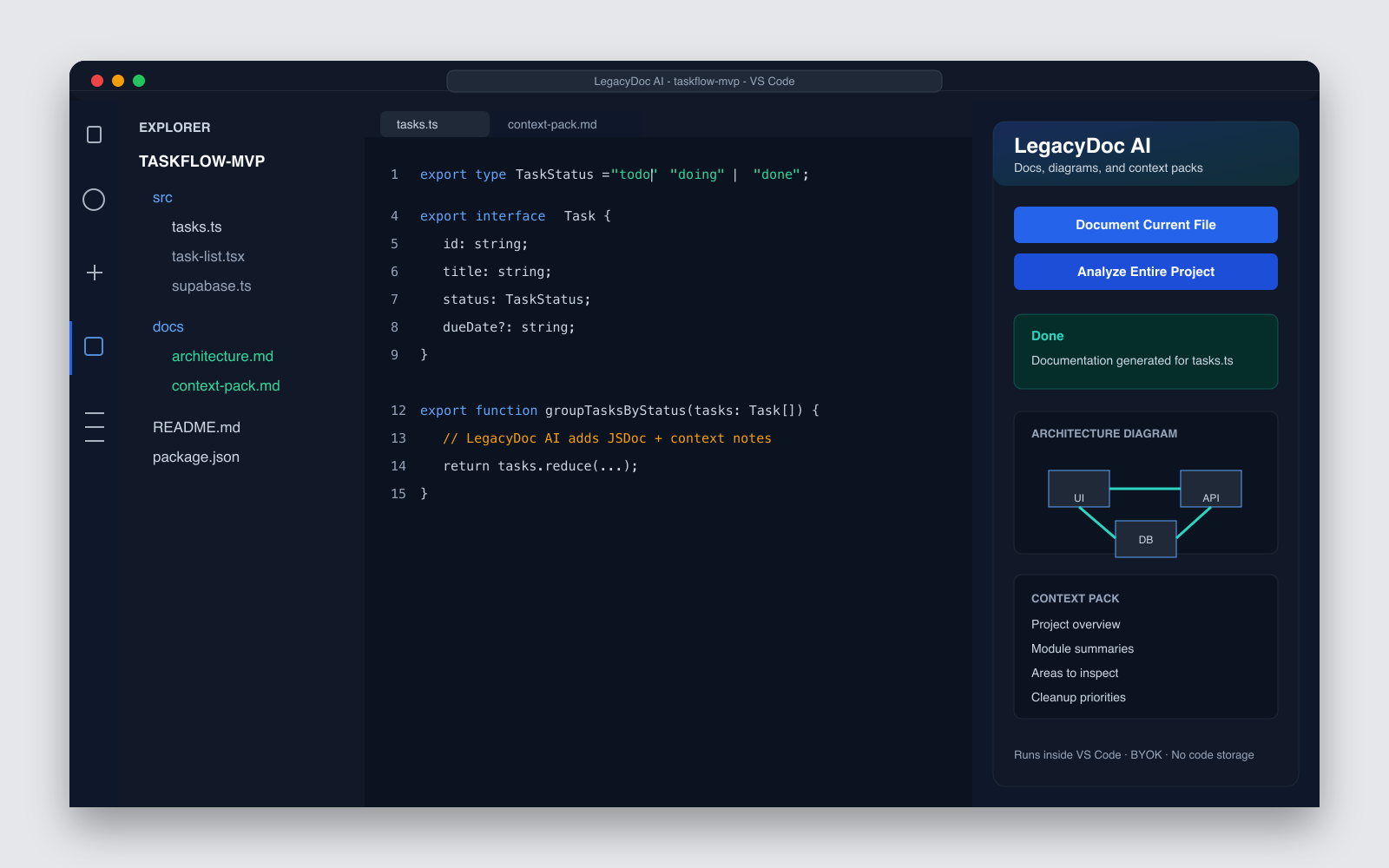
It shows the structure, cleanup handoff context, and level of detail LegacyDoc AI can generate from your codebase.
This is an example format — not a real customer report, not a security audit, and not an automatic fix.
See the sections a useful AI code audit report should include before cleanup.
Cleanup handoff context
Give a developer, freelancer, or AI coding tool the architecture and priorities first.
Clear boundary
This is not a formal security audit, vulnerability scan, or automatic code fix.
How to read the sample
How to read this AI code audit report example
This AI code audit report example is meant to show what useful cleanup context looks like before a developer,
freelancer, or AI coding agent changes the project. It is not a decorative sample. A good AI code audit report example
should let a reviewer understand the product, the stack, the architecture, the risky modules, and the first cleanup tasks
without opening every file in the repository.
Use this AI code audit report example as a standard for your own handoff. If your current project brief is only
“please clean up this repo,” it is too vague. A stronger brief explains what the app does, what must keep working,
which files feel risky, what needs documentation, and which changes should happen first. That is the difference between
a cleanup conversation and a guesswork session.
What the overview should answer
A useful AI code audit report example starts with project purpose, stack, size, current status, and the reason the audit exists. The reviewer should know whether the goal is cleanup, launch prep, handoff, or refactor planning.
What the architecture map should answer
The architecture section should show routes, modules, data flow, and ownership boundaries. In this AI code audit report example, the folder map tells a cleanup specialist where to look before they quote the work.
What areas to inspect should answer
Areas to inspect should be specific enough to guide action: a route file, a server/client boundary, an oversized component, a config file, or a missing test path. This keeps the AI code audit report example practical.
What cleanup priorities should answer
Cleanup priorities should turn context into sequence. The report should say which task comes first, which task can wait, and which task needs a human review before an AI coding tool attempts a rewrite.
Minimum bar for your own report
After reading your own report, another person should be able to name the product, identify the most important modules,
list three review risks, and choose the first cleanup task. If they cannot do that, use this AI code audit report example
as a checklist and generate a clearer context pack before you hire help or ask an AI coding tool to refactor.
Keep the assumptions visible too. Mark anything that comes from filenames, comments, dependency names, or a quick read of
the UI as an assumption until a maintainer confirms it. That small habit prevents a cleanup plan from turning guessed
architecture into fake certainty.
Audit Report
taskflow-mvp · sample
Generated by LegacyDoc AI · Local VS Code workspace
v0.12026-05-06Example
Stack
Next.js 15 · Supabase · Tailwind
Size
~12k LOC · TypeScript
Origin
Built with Cursor + Claude Code
01 — Project overview
A working MVP without docs
A SaaS dashboard for personal task management, built quickly across three weekends.
The app runs end-to-end and has been deployed to Vercel, but there are no automated tests, no README,
and key design decisions live only in chat history with the AI tools used to build it.
app/dashboard/tasks — largest surface area; CRUD for tasks plus filters and sorting.
app/api/tasks — thin route handlers; delegates to lib/supabase and lib/auth.
lib/supabase — centralizes DB access; mixes server and client usage in places.
lib/auth — wraps Supabase auth; some duplication with route handler logic.
lib/ai — optional GPT-powered task suggestions; behind a feature flag.
04 — Areas to inspect
Review these before changing anything
app/api/tasks/route.ts — review input parsing and error handling for edge cases.
lib/supabase.ts — verify which exports are server-only vs client-safe.
app/dashboard/tasks/TaskList.tsx — 380 lines; consider splitting by responsibility.
lib/ai.ts — confirm feature flag behavior and timeout handling.
next.config.mjs — verify env var loading and image domains.
05 — Cleanup priorities
What to address first
Split TaskList into TaskList + TaskRow + TaskFilters.
Move all DB-accessing functions to server-only modules.
Add input parsing helper for API routes (consistent shape, consistent errors).
Add JSDoc to public exports in lib/* for AI tool readability.
Document required environment variables in README.
06 — AI-ready review notes
Hand this to Claude Code, Cursor, or Codex
prompt.md
Use the architecture map and module summaries as project context.
Help me split TaskList.tsx into smaller components without changing
behavior. Then propose a unified input parsing helper for API routes.

Files to attach:
- app/dashboard/tasks/TaskList.tsx
- app/api/tasks/route.ts
- lib/supabase.ts
07 — What to do next
A four-step plan
Review areas to inspect with a developer or via AI-assisted review.
Tackle cleanup priorities in small, reviewable PRs.
Re-run the audit after major changes to keep context fresh.
If hiring a vibe code cleanup specialist, share this report on day 1.
Reminder: This is an example format, not a real customer report and not a security audit.
LegacyDoc AI helps generate context, architecture maps, and review notes — it does not perform automatic fixes,
vulnerability scanning, or formal security certification.
When to copy this structure
Copy this structure when the project already works but nobody can explain the codebase quickly.
It is especially useful before a paid cleanup engagement, a technical handoff, a founder-to-developer transition,
or a refactor sprint where the team needs shared context before changing behavior. The structure works best when
the report is tied to real files, real flows, and a short list of next actions.
When not to copy it blindly
Do not use this sample as a replacement for security review, production incident review, compliance review,
or deep performance profiling. Those jobs need specialized tools and expert judgment. This sample is about
making a messy codebase understandable enough for the next cleanup decision. Keep the format, but change the
sections if your project needs database migration notes, payment flow checks, mobile release steps, or model
evaluation evidence.
FAQ
What is included in this sample AI code audit report?
The sample includes a project overview, architecture map, module summaries, areas to inspect, cleanup priorities, and AI-ready review notes for a fictional AI-generated app.
How should I use this AI code audit report example?
Use the AI code audit report example as a reference for what to collect before cleanup: project overview, architecture map, module summaries, areas to inspect, cleanup priorities, and AI-ready review notes.
Can I use this example before hiring someone for code cleanup?
Yes. The format is useful as a cleanup handoff reference because it shows what context a developer, freelancer, or AI coding tool needs before changing a codebase.
Is this sample report a security audit?
No. This is an example of a code understanding and cleanup-preparation report. It is not a real customer report, formal security audit, vulnerability scan, or compliance review.
Generate one for your own codebase
Runs inside VS Code. BYOK. No code storage or proxying by RomantiCode.
This section keeps AI code audit report example focused on one search intent. A reader comparing options for AI code audit report example
should quickly see the task, the evidence, the handoff value, and the next action without leaving the page.
RomantiCode uses real VS Code context to support AI code audit report example decisions before cleanup, audit, or handoff.
AI code audit report example checkpoint 1
Use AI code audit report example as the page promise, then verify that AI code audit report example is supported by the headline,
the example, the internal links, the call to action, and the reader's next step. A strong AI code audit report example
page should explain who needs AI code audit report example, what evidence is required before acting, and how RomantiCode
reduces uncertainty for founders, developers, cleanup specialists, and AI coding agents. Keep the
AI code audit report example checklist tied to a real workflow: inspect the codebase, map risky files, prepare context,
compare options, and decide whether to audit, refactor, hire help, or continue with an AI assistant.
AI code audit report example checkpoint 2
Use AI code audit report example as the page promise, then verify that AI code audit report example is supported by the headline,
the example, the internal links, the call to action, and the reader's next step. A strong AI code audit report example
page should explain who needs AI code audit report example, what evidence is required before acting, and how RomantiCode
reduces uncertainty for founders, developers, cleanup specialists, and AI coding agents. Keep the
AI code audit report example checklist tied to a real workflow: inspect the codebase, map risky files, prepare context,
compare options, and decide whether to audit, refactor, hire help, or continue with an AI assistant.
AI code audit report example checkpoint 3
Use AI code audit report example as the page promise, then verify that AI code audit report example is supported by the headline,
the example, the internal links, the call to action, and the reader's next step. A strong AI code audit report example
page should explain who needs AI code audit report example, what evidence is required before acting, and how RomantiCode
reduces uncertainty for founders, developers, cleanup specialists, and AI coding agents. Keep the
AI code audit report example checklist tied to a real workflow: inspect the codebase, map risky files, prepare context,
compare options, and decide whether to audit, refactor, hire help, or continue with an AI assistant.
AI code audit report example checkpoint 4
Use AI code audit report example as the page promise, then verify that AI code audit report example is supported by the headline,
the example, the internal links, the call to action, and the reader's next step. A strong AI code audit report example
page should explain who needs AI code audit report example, what evidence is required before acting, and how RomantiCode
reduces uncertainty for founders, developers, cleanup specialists, and AI coding agents. Keep the
AI code audit report example checklist tied to a real workflow: inspect the codebase, map risky files, prepare context,
compare options, and decide whether to audit, refactor, hire help, or continue with an AI assistant.
AI code audit report example checkpoint 5
Use AI code audit report example as the page promise, then verify that AI code audit report example is supported by the headline,
the example, the internal links, the call to action, and the reader's next step. A strong AI code audit report example
page should explain who needs AI code audit report example, what evidence is required before acting, and how RomantiCode
reduces uncertainty for founders, developers, cleanup specialists, and AI coding agents. Keep the
AI code audit report example checklist tied to a real workflow: inspect the codebase, map risky files, prepare context,
compare options, and decide whether to audit, refactor, hire help, or continue with an AI assistant.
AI code audit report example checkpoint 6
Use AI code audit report example as the page promise, then verify that AI code audit report example is supported by the headline,
the example, the internal links, the call to action, and the reader's next step. A strong AI code audit report example
page should explain who needs AI code audit report example, what evidence is required before acting, and how RomantiCode
reduces uncertainty for founders, developers, cleanup specialists, and AI coding agents. Keep the
AI code audit report example checklist tied to a real workflow: inspect the codebase, map risky files, prepare context,
compare options, and decide whether to audit, refactor, hire help, or continue with an AI assistant.
AI code audit report example checkpoint 7
Use AI code audit report example as the page promise, then verify that AI code audit report example is supported by the headline,
the example, the internal links, the call to action, and the reader's next step. A strong AI code audit report example
page should explain who needs AI code audit report example, what evidence is required before acting, and how RomantiCode
reduces uncertainty for founders, developers, cleanup specialists, and AI coding agents. Keep the
AI code audit report example checklist tied to a real workflow: inspect the codebase, map risky files, prepare context,
compare options, and decide whether to audit, refactor, hire help, or continue with an AI assistant.
AI code audit report example checkpoint 8
Use AI code audit report example as the page promise, then verify that AI code audit report example is supported by the headline,
the example, the internal links, the call to action, and the reader's next step. A strong AI code audit report example
page should explain who needs AI code audit report example, what evidence is required before acting, and how RomantiCode
reduces uncertainty for founders, developers, cleanup specialists, and AI coding agents. Keep the
AI code audit report example checklist tied to a real workflow: inspect the codebase, map risky files, prepare context,
compare options, and decide whether to audit, refactor, hire help, or continue with an AI assistant.
AI code audit report example checkpoint 9
Use AI code audit report example as the page promise, then verify that AI code audit report example is supported by the headline,
the example, the internal links, the call to action, and the reader's next step. A strong AI code audit report example
page should explain who needs AI code audit report example, what evidence is required before acting, and how RomantiCode
reduces uncertainty for founders, developers, cleanup specialists, and AI coding agents. Keep the
AI code audit report example checklist tied to a real workflow: inspect the codebase, map risky files, prepare context,
compare options, and decide whether to audit, refactor, hire help, or continue with an AI assistant.
AI code audit report example checkpoint 10
Use AI code audit report example as the page promise, then verify that AI code audit report example is supported by the headline,
the example, the internal links, the call to action, and the reader's next step. A strong AI code audit report example
page should explain who needs AI code audit report example, what evidence is required before acting, and how RomantiCode
reduces uncertainty for founders, developers, cleanup specialists, and AI coding agents. Keep the
AI code audit report example checklist tied to a real workflow: inspect the codebase, map risky files, prepare context,
compare options, and decide whether to audit, refactor, hire help, or continue with an AI assistant.
AI code audit report example checkpoint 11
Use AI code audit report example as the page promise, then verify that AI code audit report example is supported by the headline,
the example, the internal links, the call to action, and the reader's next step. A strong AI code audit report example
page should explain who needs AI code audit report example, what evidence is required before acting, and how RomantiCode
reduces uncertainty for founders, developers, cleanup specialists, and AI coding agents. Keep the
AI code audit report example checklist tied to a real workflow: inspect the codebase, map risky files, prepare context,
compare options, and decide whether to audit, refactor, hire help, or continue with an AI assistant.
AI code audit report example checkpoint 12
Use AI code audit report example as the page promise, then verify that AI code audit report example is supported by the headline,
the example, the internal links, the call to action, and the reader's next step. A strong AI code audit report example
page should explain who needs AI code audit report example, what evidence is required before acting, and how RomantiCode
reduces uncertainty for founders, developers, cleanup specialists, and AI coding agents. Keep the
AI code audit report example checklist tied to a real workflow: inspect the codebase, map risky files, prepare context,
compare options, and decide whether to audit, refactor, hire help, or continue with an AI assistant.
AI code audit report example checkpoint 13
Use AI code audit report example as the page promise, then verify that AI code audit report example is supported by the headline,
the example, the internal links, the call to action, and the reader's next step. A strong AI code audit report example
page should explain who needs AI code audit report example, what evidence is required before acting, and how RomantiCode
reduces uncertainty for founders, developers, cleanup specialists, and AI coding agents. Keep the
AI code audit report example checklist tied to a real workflow: inspect the codebase, map risky files, prepare context,
compare options, and decide whether to audit, refactor, hire help, or continue with an AI assistant.
AI code audit report example checkpoint 14
Use AI code audit report example as the page promise, then verify that AI code audit report example is supported by the headline,
the example, the internal links, the call to action, and the reader's next step. A strong AI code audit report example
page should explain who needs AI code audit report example, what evidence is required before acting, and how RomantiCode
reduces uncertainty for founders, developers, cleanup specialists, and AI coding agents. Keep the
AI code audit report example checklist tied to a real workflow: inspect the codebase, map risky files, prepare context,
compare options, and decide whether to audit, refactor, hire help, or continue with an AI assistant.
AI code audit report example checkpoint 15
Use AI code audit report example as the page promise, then verify that AI code audit report example is supported by the headline,
the example, the internal links, the call to action, and the reader's next step. A strong AI code audit report example
page should explain who needs AI code audit report example, what evidence is required before acting, and how RomantiCode
reduces uncertainty for founders, developers, cleanup specialists, and AI coding agents. Keep the
AI code audit report example checklist tied to a real workflow: inspect the codebase, map risky files, prepare context,
compare options, and decide whether to audit, refactor, hire help, or continue with an AI assistant.
AI code audit report example checkpoint 16
Use AI code audit report example as the page promise, then verify that AI code audit report example is supported by the headline,
the example, the internal links, the call to action, and the reader's next step. A strong AI code audit report example
page should explain who needs AI code audit report example, what evidence is required before acting, and how RomantiCode
reduces uncertainty for founders, developers, cleanup specialists, and AI coding agents. Keep the
AI code audit report example checklist tied to a real workflow: inspect the codebase, map risky files, prepare context,
compare options, and decide whether to audit, refactor, hire help, or continue with an AI assistant.
AI code audit report example checkpoint 17
Use AI code audit report example as the page promise, then verify that AI code audit report example is supported by the headline,
the example, the internal links, the call to action, and the reader's next step. A strong AI code audit report example
page should explain who needs AI code audit report example, what evidence is required before acting, and how RomantiCode
reduces uncertainty for founders, developers, cleanup specialists, and AI coding agents. Keep the
AI code audit report example checklist tied to a real workflow: inspect the codebase, map risky files, prepare context,
compare options, and decide whether to audit, refactor, hire help, or continue with an AI assistant.
AI code audit report example checkpoint 18
Use AI code audit report example as the page promise, then verify that AI code audit report example is supported by the headline,
the example, the internal links, the call to action, and the reader's next step. A strong AI code audit report example
page should explain who needs AI code audit report example, what evidence is required before acting, and how RomantiCode
reduces uncertainty for founders, developers, cleanup specialists, and AI coding agents. Keep the
AI code audit report example checklist tied to a real workflow: inspect the codebase, map risky files, prepare context,
compare options, and decide whether to audit, refactor, hire help, or continue with an AI assistant.
AI code audit report example checkpoint 19
Use AI code audit report example as the page promise, then verify that AI code audit report example is supported by the headline,
the example, the internal links, the call to action, and the reader's next step. A strong AI code audit report example
page should explain who needs AI code audit report example, what evidence is required before acting, and how RomantiCode
reduces uncertainty for founders, developers, cleanup specialists, and AI coding agents. Keep the
AI code audit report example checklist tied to a real workflow: inspect the codebase, map risky files, prepare context,
compare options, and decide whether to audit, refactor, hire help, or continue with an AI assistant.
AI code audit report example checkpoint 20
Use AI code audit report example as the page promise, then verify that AI code audit report example is supported by the headline,
the example, the internal links, the call to action, and the reader's next step. A strong AI code audit report example
page should explain who needs AI code audit report example, what evidence is required before acting, and how RomantiCode
reduces uncertainty for founders, developers, cleanup specialists, and AI coding agents. Keep the
AI code audit report example checklist tied to a real workflow: inspect the codebase, map risky files, prepare context,
compare options, and decide whether to audit, refactor, hire help, or continue with an AI assistant.
AI code audit report example checkpoint 21
Use AI code audit report example as the page promise, then verify that AI code audit report example is supported by the headline,
the example, the internal links, the call to action, and the reader's next step. A strong AI code audit report example
page should explain who needs AI code audit report example, what evidence is required before acting, and how RomantiCode
reduces uncertainty for founders, developers, cleanup specialists, and AI coding agents. Keep the
AI code audit report example checklist tied to a real workflow: inspect the codebase, map risky files, prepare context,
compare options, and decide whether to audit, refactor, hire help, or continue with an AI assistant.
AI code audit report example checkpoint 22
Use AI code audit report example as the page promise, then verify that AI code audit report example is supported by the headline,
the example, the internal links, the call to action, and the reader's next step. A strong AI code audit report example
page should explain who needs AI code audit report example, what evidence is required before acting, and how RomantiCode
reduces uncertainty for founders, developers, cleanup specialists, and AI coding agents. Keep the
AI code audit report example checklist tied to a real workflow: inspect the codebase, map risky files, prepare context,
compare options, and decide whether to audit, refactor, hire help, or continue with an AI assistant.
AI code audit report example checkpoint 23
Use AI code audit report example as the page promise, then verify that AI code audit report example is supported by the headline,
the example, the internal links, the call to action, and the reader's next step. A strong AI code audit report example
page should explain who needs AI code audit report example, what evidence is required before acting, and how RomantiCode
reduces uncertainty for founders, developers, cleanup specialists, and AI coding agents. Keep the
AI code audit report example checklist tied to a real workflow: inspect the codebase, map risky files, prepare context,
compare options, and decide whether to audit, refactor, hire help, or continue with an AI assistant.
AI code audit report example checkpoint 24
Use AI code audit report example as the page promise, then verify that AI code audit report example is supported by the headline,
the example, the internal links, the call to action, and the reader's next step. A strong AI code audit report example
page should explain who needs AI code audit report example, what evidence is required before acting, and how RomantiCode
reduces uncertainty for founders, developers, cleanup specialists, and AI coding agents. Keep the
AI code audit report example checklist tied to a real workflow: inspect the codebase, map risky files, prepare context,
compare options, and decide whether to audit, refactor, hire help, or continue with an AI assistant.
AI code audit report example checkpoint 25
Use AI code audit report example as the page promise, then verify that AI code audit report example is supported by the headline,
the example, the internal links, the call to action, and the reader's next step. A strong AI code audit report example
page should explain who needs AI code audit report example, what evidence is required before acting, and how RomantiCode
reduces uncertainty for founders, developers, cleanup specialists, and AI coding agents. Keep the
AI code audit report example checklist tied to a real workflow: inspect the codebase, map risky files, prepare context,
compare options, and decide whether to audit, refactor, hire help, or continue with an AI assistant.
AI code audit report example checkpoint 26
Use AI code audit report example as the page promise, then verify that AI code audit report example is supported by the headline,
the example, the internal links, the call to action, and the reader's next step. A strong AI code audit report example
page should explain who needs AI code audit report example, what evidence is required before acting, and how RomantiCode
reduces uncertainty for founders, developers, cleanup specialists, and AI coding agents. Keep the
AI code audit report example checklist tied to a real workflow: inspect the codebase, map risky files, prepare context,
compare options, and decide whether to audit, refactor, hire help, or continue with an AI assistant.
AI code audit report example checkpoint 27
Use AI code audit report example as the page promise, then verify that AI code audit report example is supported by the headline,
the example, the internal links, the call to action, and the reader's next step. A strong AI code audit report example
page should explain who needs AI code audit report example, what evidence is required before acting, and how RomantiCode
reduces uncertainty for founders, developers, cleanup specialists, and AI coding agents. Keep the
AI code audit report example checklist tied to a real workflow: inspect the codebase, map risky files, prepare context,
compare options, and decide whether to audit, refactor, hire help, or continue with an AI assistant.
AI code audit report example checkpoint 28
Use AI code audit report example as the page promise, then verify that AI code audit report example is supported by the headline,
the example, the internal links, the call to action, and the reader's next step. A strong AI code audit report example
page should explain who needs AI code audit report example, what evidence is required before acting, and how RomantiCode
reduces uncertainty for founders, developers, cleanup specialists, and AI coding agents. Keep the
AI code audit report example checklist tied to a real workflow: inspect the codebase, map risky files, prepare context,
compare options, and decide whether to audit, refactor, hire help, or continue with an AI assistant.
AI code audit report example checkpoint 29
Use AI code audit report example as the page promise, then verify that AI code audit report example is supported by the headline,
the example, the internal links, the call to action, and the reader's next step. A strong AI code audit report example
page should explain who needs AI code audit report example, what evidence is required before acting, and how RomantiCode
reduces uncertainty for founders, developers, cleanup specialists, and AI coding agents. Keep the
AI code audit report example checklist tied to a real workflow: inspect the codebase, map risky files, prepare context,
compare options, and decide whether to audit, refactor, hire help, or continue with an AI assistant.
AI code audit report example checkpoint 30
Use AI code audit report example as the page promise, then verify that AI code audit report example is supported by the headline,
the example, the internal links, the call to action, and the reader's next step. A strong AI code audit report example
page should explain who needs AI code audit report example, what evidence is required before acting, and how RomantiCode
reduces uncertainty for founders, developers, cleanup specialists, and AI coding agents. Keep the
AI code audit report example checklist tied to a real workflow: inspect the codebase, map risky files, prepare context,
compare options, and decide whether to audit, refactor, hire help, or continue with an AI assistant.
AI code audit report example checkpoint 31
Use AI code audit report example as the page promise, then verify that AI code audit report example is supported by the headline,
the example, the internal links, the call to action, and the reader's next step. A strong AI code audit report example
page should explain who needs AI code audit report example, what evidence is required before acting, and how RomantiCode
reduces uncertainty for founders, developers, cleanup specialists, and AI coding agents. Keep the
AI code audit report example checklist tied to a real workflow: inspect the codebase, map risky files, prepare context,
compare options, and decide whether to audit, refactor, hire help, or continue with an AI assistant.
AI code audit report example checkpoint 32
Use AI code audit report example as the page promise, then verify that AI code audit report example is supported by the headline,
the example, the internal links, the call to action, and the reader's next step. A strong AI code audit report example
page should explain who needs AI code audit report example, what evidence is required before acting, and how RomantiCode
reduces uncertainty for founders, developers, cleanup specialists, and AI coding agents. Keep the
AI code audit report example checklist tied to a real workflow: inspect the codebase, map risky files, prepare context,
compare options, and decide whether to audit, refactor, hire help, or continue with an AI assistant.
AI code audit report example checkpoint 33
Use AI code audit report example as the page promise, then verify that AI code audit report example is supported by the headline,
the example, the internal links, the call to action, and the reader's next step. A strong AI code audit report example
page should explain who needs AI code audit report example, what evidence is required before acting, and how RomantiCode
reduces uncertainty for founders, developers, cleanup specialists, and AI coding agents. Keep the
AI code audit report example checklist tied to a real workflow: inspect the codebase, map risky files, prepare context,
compare options, and decide whether to audit, refactor, hire help, or continue with an AI assistant.
AI code audit report example checkpoint 34
Use AI code audit report example as the page promise, then verify that AI code audit report example is supported by the headline,
the example, the internal links, the call to action, and the reader's next step. A strong AI code audit report example
page should explain who needs AI code audit report example, what evidence is required before acting, and how RomantiCode
reduces uncertainty for founders, developers, cleanup specialists, and AI coding agents. Keep the
AI code audit report example checklist tied to a real workflow: inspect the codebase, map risky files, prepare context,
compare options, and decide whether to audit, refactor, hire help, or continue with an AI assistant.
AI code audit report example checkpoint 35
Use AI code audit report example as the page promise, then verify that AI code audit report example is supported by the headline,
the example, the internal links, the call to action, and the reader's next step. A strong AI code audit report example
page should explain who needs AI code audit report example, what evidence is required before acting, and how RomantiCode
reduces uncertainty for founders, developers, cleanup specialists, and AI coding agents. Keep the
AI code audit report example checklist tied to a real workflow: inspect the codebase, map risky files, prepare context,
compare options, and decide whether to audit, refactor, hire help, or continue with an AI assistant.
AI code audit report example checkpoint 36
Use AI code audit report example as the page promise, then verify that AI code audit report example is supported by the headline,
the example, the internal links, the call to action, and the reader's next step. A strong AI code audit report example
page should explain who needs AI code audit report example, what evidence is required before acting, and how RomantiCode
reduces uncertainty for founders, developers, cleanup specialists, and AI coding agents. Keep the
AI code audit report example checklist tied to a real workflow: inspect the codebase, map risky files, prepare context,
compare options, and decide whether to audit, refactor, hire help, or continue with an AI assistant.
AI code audit report example checkpoint 37
Use AI code audit report example as the page promise, then verify that AI code audit report example is supported by the headline,
the example, the internal links, the call to action, and the reader's next step. A strong AI code audit report example
page should explain who needs AI code audit report example, what evidence is required before acting, and how RomantiCode
reduces uncertainty for founders, developers, cleanup specialists, and AI coding agents. Keep the
AI code audit report example checklist tied to a real workflow: inspect the codebase, map risky files, prepare context,
compare options, and decide whether to audit, refactor, hire help, or continue with an AI assistant.
AI code audit report example checkpoint 38
Use AI code audit report example as the page promise, then verify that AI code audit report example is supported by the headline,
the example, the internal links, the call to action, and the reader's next step. A strong AI code audit report example
page should explain who needs AI code audit report example, what evidence is required before acting, and how RomantiCode
reduces uncertainty for founders, developers, cleanup specialists, and AI coding agents. Keep the
AI code audit report example checklist tied to a real workflow: inspect the codebase, map risky files, prepare context,
compare options, and decide whether to audit, refactor, hire help, or continue with an AI assistant.
AI code audit report example checkpoint 39
Use AI code audit report example as the page promise, then verify that AI code audit report example is supported by the headline,
the example, the internal links, the call to action, and the reader's next step. A strong AI code audit report example
page should explain who needs AI code audit report example, what evidence is required before acting, and how RomantiCode
reduces uncertainty for founders, developers, cleanup specialists, and AI coding agents. Keep the
AI code audit report example checklist tied to a real workflow: inspect the codebase, map risky files, prepare context,
compare options, and decide whether to audit, refactor, hire help, or continue with an AI assistant.
AI code audit report example checkpoint 40
Use AI code audit report example as the page promise, then verify that AI code audit report example is supported by the headline,
the example, the internal links, the call to action, and the reader's next step. A strong AI code audit report example
page should explain who needs AI code audit report example, what evidence is required before acting, and how RomantiCode
reduces uncertainty for founders, developers, cleanup specialists, and AI coding agents. Keep the
AI code audit report example checklist tied to a real workflow: inspect the codebase, map risky files, prepare context,
compare options, and decide whether to audit, refactor, hire help, or continue with an AI assistant.
AI code audit report example checkpoint 41
Use AI code audit report example as the page promise, then verify that AI code audit report example is supported by the headline,
the example, the internal links, the call to action, and the reader's next step. A strong AI code audit report example
page should explain who needs AI code audit report example, what evidence is required before acting, and how RomantiCode
reduces uncertainty for founders, developers, cleanup specialists, and AI coding agents. Keep the
AI code audit report example checklist tied to a real workflow: inspect the codebase, map risky files, prepare context,
compare options, and decide whether to audit, refactor, hire help, or continue with an AI assistant.
AI code audit report example checkpoint 42
Use AI code audit report example as the page promise, then verify that AI code audit report example is supported by the headline,
the example, the internal links, the call to action, and the reader's next step. A strong AI code audit report example
page should explain who needs AI code audit report example, what evidence is required before acting, and how RomantiCode
reduces uncertainty for founders, developers, cleanup specialists, and AI coding agents. Keep the
AI code audit report example checklist tied to a real workflow: inspect the codebase, map risky files, prepare context,
compare options, and decide whether to audit, refactor, hire help, or continue with an AI assistant.
AI code audit report example checkpoint 43
Use AI code audit report example as the page promise, then verify that AI code audit report example is supported by the headline,
the example, the internal links, the call to action, and the reader's next step. A strong AI code audit report example
page should explain who needs AI code audit report example, what evidence is required before acting, and how RomantiCode
reduces uncertainty for founders, developers, cleanup specialists, and AI coding agents. Keep the
AI code audit report example checklist tied to a real workflow: inspect the codebase, map risky files, prepare context,
compare options, and decide whether to audit, refactor, hire help, or continue with an AI assistant.
AI code audit report example checkpoint 44
Use AI code audit report example as the page promise, then verify that AI code audit report example is supported by the headline,
the example, the internal links, the call to action, and the reader's next step. A strong AI code audit report example
page should explain who needs AI code audit report example, what evidence is required before acting, and how RomantiCode
reduces uncertainty for founders, developers, cleanup specialists, and AI coding agents. Keep the
AI code audit report example checklist tied to a real workflow: inspect the codebase, map risky files, prepare context,
compare options, and decide whether to audit, refactor, hire help, or continue with an AI assistant.
AI code audit report example checkpoint 45
Use AI code audit report example as the page promise, then verify that AI code audit report example is supported by the headline,
the example, the internal links, the call to action, and the reader's next step. A strong AI code audit report example
page should explain who needs AI code audit report example, what evidence is required before acting, and how RomantiCode
reduces uncertainty for founders, developers, cleanup specialists, and AI coding agents. Keep the
AI code audit report example checklist tied to a real workflow: inspect the codebase, map risky files, prepare context,
compare options, and decide whether to audit, refactor, hire help, or continue with an AI assistant.
AI code audit report example checkpoint 46
Use AI code audit report example as the page promise, then verify that AI code audit report example is supported by the headline,
the example, the internal links, the call to action, and the reader's next step. A strong AI code audit report example
page should explain who needs AI code audit report example, what evidence is required before acting, and how RomantiCode
reduces uncertainty for founders, developers, cleanup specialists, and AI coding agents. Keep the
AI code audit report example checklist tied to a real workflow: inspect the codebase, map risky files, prepare context,
compare options, and decide whether to audit, refactor, hire help, or continue with an AI assistant.
AI code audit report example checkpoint 47
Use AI code audit report example as the page promise, then verify that AI code audit report example is supported by the headline,
the example, the internal links, the call to action, and the reader's next step. A strong AI code audit report example
page should explain who needs AI code audit report example, what evidence is required before acting, and how RomantiCode
reduces uncertainty for founders, developers, cleanup specialists, and AI coding agents. Keep the
AI code audit report example checklist tied to a real workflow: inspect the codebase, map risky files, prepare context,
compare options, and decide whether to audit, refactor, hire help, or continue with an AI assistant.
AI code audit report example checkpoint 48
Use AI code audit report example as the page promise, then verify that AI code audit report example is supported by the headline,
the example, the internal links, the call to action, and the reader's next step. A strong AI code audit report example
page should explain who needs AI code audit report example, what evidence is required before acting, and how RomantiCode
reduces uncertainty for founders, developers, cleanup specialists, and AI coding agents. Keep the
AI code audit report example checklist tied to a real workflow: inspect the codebase, map risky files, prepare context,
compare options, and decide whether to audit, refactor, hire help, or continue with an AI assistant.
AI code audit report example checkpoint 49
Use AI code audit report example as the page promise, then verify that AI code audit report example is supported by the headline,
the example, the internal links, the call to action, and the reader's next step. A strong AI code audit report example
page should explain who needs AI code audit report example, what evidence is required before acting, and how RomantiCode
reduces uncertainty for founders, developers, cleanup specialists, and AI coding agents. Keep the
AI code audit report example checklist tied to a real workflow: inspect the codebase, map risky files, prepare context,
compare options, and decide whether to audit, refactor, hire help, or continue with an AI assistant.
AI code audit report example checkpoint 50
Use AI code audit report example as the page promise, then verify that AI code audit report example is supported by the headline,
the example, the internal links, the call to action, and the reader's next step. A strong AI code audit report example
page should explain who needs AI code audit report example, what evidence is required before acting, and how RomantiCode
reduces uncertainty for founders, developers, cleanup specialists, and AI coding agents. Keep the
AI code audit report example checklist tied to a real workflow: inspect the codebase, map risky files, prepare context,
compare options, and decide whether to audit, refactor, hire help, or continue with an AI assistant.
AI code audit report example checkpoint 51
Use AI code audit report example as the page promise, then verify that AI code audit report example is supported by the headline,
the example, the internal links, the call to action, and the reader's next step. A strong AI code audit report example
page should explain who needs AI code audit report example, what evidence is required before acting, and how RomantiCode
reduces uncertainty for founders, developers, cleanup specialists, and AI coding agents. Keep the
AI code audit report example checklist tied to a real workflow: inspect the codebase, map risky files, prepare context,
compare options, and decide whether to audit, refactor, hire help, or continue with an AI assistant.
AI code audit report example checkpoint 52
Use AI code audit report example as the page promise, then verify that AI code audit report example is supported by the headline,
the example, the internal links, the call to action, and the reader's next step. A strong AI code audit report example
page should explain who needs AI code audit report example, what evidence is required before acting, and how RomantiCode
reduces uncertainty for founders, developers, cleanup specialists, and AI coding agents. Keep the
AI code audit report example checklist tied to a real workflow: inspect the codebase, map risky files, prepare context,
compare options, and decide whether to audit, refactor, hire help, or continue with an AI assistant.