Build AI codebase understanding before AI coding tools change anything.
Claude Code, Cursor, Codex, and other AI coding tools work better when they understand the project first. LegacyDoc AI turns AI codebase understanding into a context pack from your local VS Code workspace: architecture, modules, setup notes, areas to inspect, and handoff-ready project facts.
Runs inside VS Code · BYOK · No code storage by RomantiCode
Review handoff snapshot
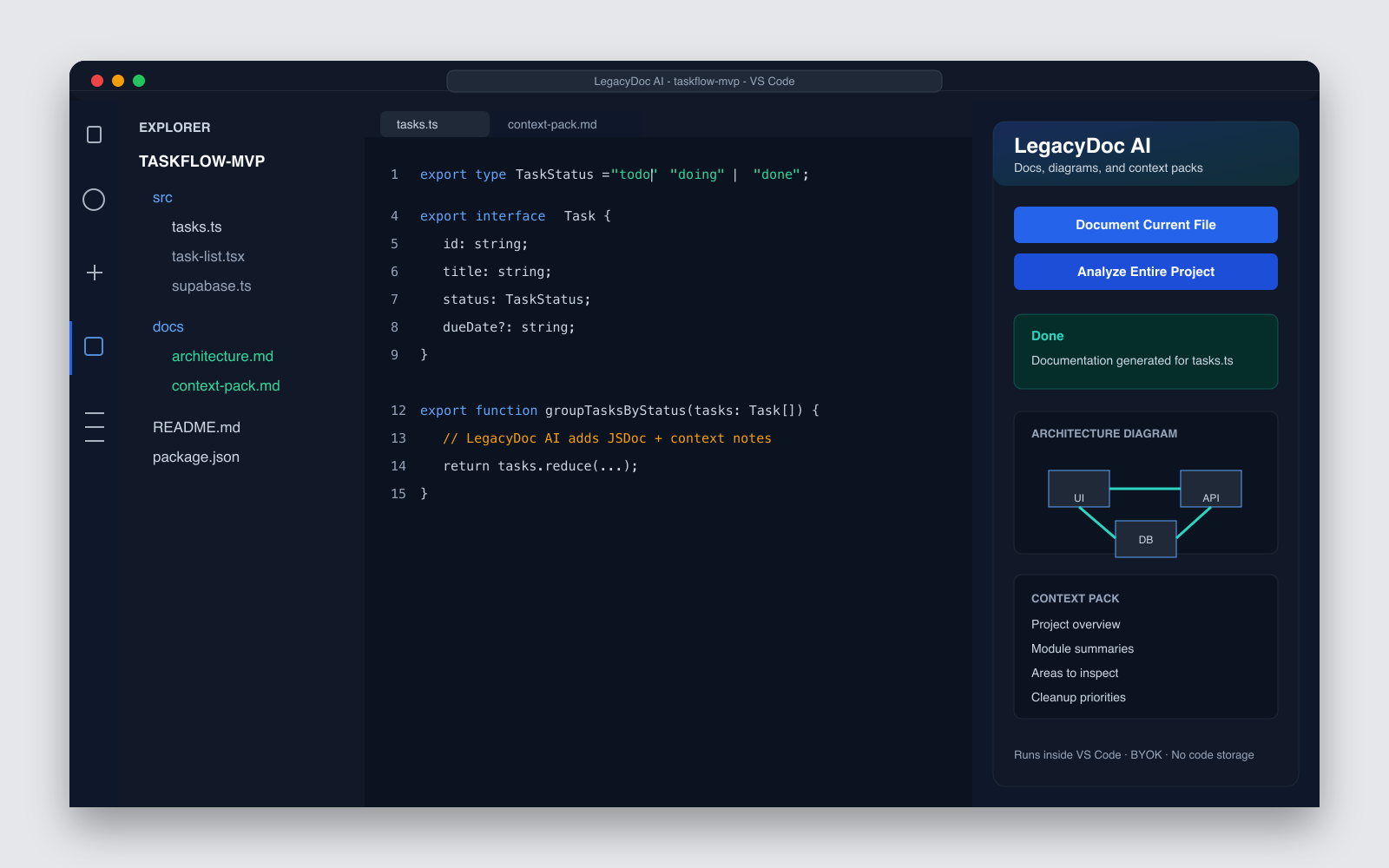
Audit focus
- Architecture map before cleanup
- Risky files and review boundaries
- Context pack for AI coding agents
Map
Audit
Handoff
If you searched
AI codebase understanding
You probably need a compact project map before asking an AI coding assistant to modify your app.
If you use
Claude Code, Cursor, or Codex
Give the agent project facts, architecture notes, and constraints instead of a vague prompt.
If you need
a PROJECT.md template
Turn AI codebase context into purpose, stack, entry points, module summaries, boundaries, and cleanup priorities.
AI codebase understanding needs a map, not more raw files.
When you inherit a large repository, the hard part is not opening another file. It is seeing how files, modules, routes, dependencies, and business flows fit together before you ask an AI tool to make changes. That is why AI codebase understanding and codebase knowledge graph workflows are resonating with developers.
LegacyDoc AI keeps the output reviewable: a codebase map, architecture notes, module summaries, risk areas, and a PROJECT.md-style brief that can be checked by a human before it becomes AI context. The goal is practical AI codebase understanding, not a vague documentation dump.
Map relationships
Start from modules, entry points, data flow, and boundaries instead of scattered files.
Ask better questions
Give Claude Code, Cursor, or Codex enough context to reason about the project shape.
Hand off clearly
Turn exploration into a shareable brief for cleanup, onboarding, review, or refactoring.
Interactive graph tools
Best for exploration
Useful when you want to click, search, and ask relationship questions across a large codebase.
LegacyDoc AI context pack
Best for reviewed handoff
Useful when you need a human-readable project brief, architecture map, and cleanup priorities before edits.
Use them together
Explore, then brief
Explore relationships first, then create a reviewed context pack that makes the next AI coding session safer.
AI codebase understanding is a real developer task, even when the wording is still early
Search demand around AI codebase understanding is still early, but the user need is visible in multiple places: people search for AI tools to understand unfamiliar codebases, developers compare codebase maps and knowledge graphs, and teams want Cursor project context before a model edits production code.
That makes this page a fit for AI codebase understanding as a long-tail SEO page and a product explanation page. It should not compete with the CodeGraph token savings calculator. This page explains the reviewed context layer; the calculator estimates whether graph-based exploration may reduce repeated agent cost.
Can the AI name the entry points?
AI codebase understanding starts with knowing where the app boots, where routes live, and which files own the main user flows.
Can the AI explain module ownership?
A useful AI codebase understanding pass should identify auth, billing, data sync, background jobs, UI shells, and risky integrations.
Can the AI respect change boundaries?
AI codebase understanding is not just a summary. It should tell the agent which files are safe to edit and which areas need human review.
Can the AI reuse the context later?
The best AI codebase understanding output becomes a PROJECT.md brief, context pack, or codebase map that survives one chat session.
What an AI-ready codebase context pack should include
Useful context is specific enough to guide changes, but small enough to fit into a real AI workflow.
Project overview
Purpose, stack, entry points, run commands, and important environment assumptions.
Architecture map
A Mermaid diagram showing routes, modules, services, data flow, and external dependencies.
Module summaries
Plain-language descriptions of what each folder and important file is responsible for.
Change boundaries
Notes about fragile areas, files to avoid editing blindly, and constraints the agent should respect.
Areas to inspect
Large files, duplicated logic, missing docs, unclear config, and risky surfaces that deserve review.
Handoff notes
A prompt-ready summary that helps a human or AI assistant understand the next task quickly.
Turn AI codebase understanding into a reusable AI coding brief
A good PROJECT.md gives coding agents the same project map a human reviewer would want:
purpose, stack, entry points, architecture notes, module ownership, constraints, and cleanup priorities.
LegacyDoc AI helps you generate AI codebase understanding from the workspace first, then review it before sharing it with an AI tool.
Prompt-ready
Paste the brief into Claude Code, Cursor, Codex, or a review handoff.
Reviewable
Keep the document small enough for a human to check before the next change.
Boundary-aware
Make risky areas and do-not-touch files visible before edits begin.
Reusable
Refresh the context when architecture or ownership changes.
Example PROJECT.md structure
Template# PROJECT.md - AI Coding Context
## Project purpose
This project is a ...
## Stack and runtime
- Framework:
- Language:
- Package manager:
- Database:
- Deployment:
## Entry points
- App entry:
- API routes:
- Background jobs:
- Config:
## Architecture map
See docs/architecture.md or the generated Mermaid diagram.
## Key modules
- src/features/tasks:
- src/lib/auth:
- src/lib/db:
## Rules for AI coding tools
- Read this file before suggesting changes.
- Keep changes small and reviewable.
- Do not rewrite unrelated modules.
- Ask before changing data models, auth, billing, or deployment config.
## Areas to inspect before cleanup
- Large files:
- Missing tests:
- Risky integrations:
- Unclear ownership:
## Cleanup priorities
1. ...
2. ...
3. ...A practical AI codebase understanding workflow
Do not start with “refactor this project.” Start by making the project legible.
-
01
Generate understanding
Open the project in VS Code and generate AI codebase understanding: docs, diagrams, and a project context pack.
-
02
Review the facts
Check the generated overview against the real code before sharing it with an AI tool.
-
03
Ask for a plan
Give the context pack to Claude Code, Cursor, or Codex and ask for a small change plan.
-
04
Change in slices
Apply one reviewable change at a time, using the context pack as the shared project map.
Raw prompts vs codebase context
Without context
- — The AI sees isolated files instead of the project shape.
- — It may miss setup rules, module boundaries, or hidden dependencies.
- — Refactor suggestions become broad, risky, and hard to review.
- — Every new session starts with the same explanation work.
With a context pack
- — The AI starts from a project overview and architecture map.
- — Constraints, risky areas, and important files are visible up front.
- — Cleanup plans can be split into smaller reviewable tasks.
- — Humans and AI tools share the same project brief.
Clear boundaries
This is a documentation and context layer, not a black-box coding agent.
Related resources
Product
LegacyDoc AI
Generate docs, diagrams, and context packs inside VS Code.
Tool
CodeGraph Token Calculator
Estimate token and tool-call savings from code graph workflows for coding agents.
Example
AI Codebase Map Example
Study a sample codebase map with entry points, module ownership, risks, and review boundaries.
Guide
Codebase to LLM File Packer
Choose what to include before pasting a repo into Claude, ChatGPT, Gemini, Cursor, or Codex.
Tool
AGENTS.md Generator
Create starter instructions for Codex, Claude Code, Cursor, and other AI coding agents.
Template
PROJECT.md Template
Copy a project context template before asking AI coding agents to edit.
Checklist
Claude Code Context Checklist
Prepare CLAUDE.md, PROJECT.md, commands, boundaries, and verification notes before Claude Code edits the repo.
Guide
Cursor Rules vs AGENTS.md
Decide what belongs in Cursor rules, AGENTS.md, PROJECT.md, and generated audit reports.
Use case
Document Legacy Code
Create documentation for existing or inherited codebases first.
Use case
Vibe Code Cleanup
Prepare AI-generated apps before cleanup or handoff.
Resource
AI Frontend Refactor
Use a context-first workflow before asking AI to refactor frontend code.
Tool
AI Code Audit Report
Turn codebase context into an audit-ready project report.
Service
AI App Launch Audit
Get a human-reviewed launch and cleanup scope after mapping your AI-built app.
Resource
Production Ready Checklist
Review an AI-built app before launch with a clear readiness checklist.
Resource
AI Model Workflows
Plan Gemini, Composer, and coding-agent workflows with codebase context first.
FAQ
What is AI codebase understanding?
AI codebase understanding means giving an AI coding tool a reviewed map of the project before it edits code: purpose, stack, entry points, architecture, important modules, dependencies, risks, and change boundaries.
How do I improve AI codebase understanding for an existing repo?
Open the repo in VS Code, generate an AI codebase understanding context pack with architecture notes and module summaries, then review the facts before sharing the context with Claude Code, Cursor, Codex, or a teammate.
Do I need an interactive codebase knowledge graph?
Interactive knowledge graphs are useful when you need to explore an unfamiliar repository and ask relationship questions. LegacyDoc AI focuses on the next step: a reviewed, shareable context pack with architecture notes, module summaries, boundaries, and cleanup priorities before AI or humans make changes.
What should a PROJECT.md for AI coding include?
A useful PROJECT.md should include project purpose, stack, entry points, architecture notes, key modules, change boundaries, areas to inspect, and cleanup priorities. The goal is to help AI coding tools understand the project before making edits.
Can I use this context with Claude Code, Cursor, or Codex?
Yes. LegacyDoc AI can generate AI-readable project context that you can paste or attach when working with Claude Code, Cursor, Codex, or another AI coding assistant.
Does LegacyDoc AI connect to MCP or provide persistent agent memory?
No. This page is about generating static documentation and context files from your local VS Code workspace. It does not claim MCP integration, persistent memory, or dynamic code search.
Will this automatically refactor my code?
No. LegacyDoc AI generates documentation, diagrams, and context. You still decide what to change, review AI suggestions, and apply code edits yourself.
Does RomantiCode store my code?
No. LegacyDoc AI runs inside VS Code. Your code is sent directly to the AI provider you configure with your own API key, not to RomantiCode servers.
Generate AI codebase understanding before the next AI coding session
Install LegacyDoc AI in VS Code and create a reviewed AI codebase understanding brief from your local workspace.
AI codebase understanding decision checklist
This section keeps AI codebase understanding focused on one search intent. A reader comparing options for AI codebase understanding should quickly see the task, the evidence, the handoff value, and the next action without leaving the page.
AI codebase understanding checkpoint 1
Use AI codebase understanding as the page promise, then verify that AI codebase understanding is supported by the headline, the example, the internal links, the call to action, and the reader's next step. A strong AI codebase understanding page should explain who needs AI codebase understanding, what evidence is required before acting, and how RomantiCode reduces uncertainty for founders, developers, cleanup specialists, and AI coding agents. Keep the AI codebase understanding checklist tied to a real workflow: inspect the codebase, map risky files, prepare context, compare options, and decide whether to audit, refactor, hire help, or continue with an AI assistant.
AI codebase understanding checkpoint 2
Use AI codebase understanding as the page promise, then verify that AI codebase understanding is supported by the headline, the example, the internal links, the call to action, and the reader's next step. A strong AI codebase understanding page should explain who needs AI codebase understanding, what evidence is required before acting, and how RomantiCode reduces uncertainty for founders, developers, cleanup specialists, and AI coding agents. Keep the AI codebase understanding checklist tied to a real workflow: inspect the codebase, map risky files, prepare context, compare options, and decide whether to audit, refactor, hire help, or continue with an AI assistant.
AI codebase understanding checkpoint 3
Use AI codebase understanding as the page promise, then verify that AI codebase understanding is supported by the headline, the example, the internal links, the call to action, and the reader's next step. A strong AI codebase understanding page should explain who needs AI codebase understanding, what evidence is required before acting, and how RomantiCode reduces uncertainty for founders, developers, cleanup specialists, and AI coding agents. Keep the AI codebase understanding checklist tied to a real workflow: inspect the codebase, map risky files, prepare context, compare options, and decide whether to audit, refactor, hire help, or continue with an AI assistant.
AI codebase understanding checkpoint 4
Use AI codebase understanding as the page promise, then verify that AI codebase understanding is supported by the headline, the example, the internal links, the call to action, and the reader's next step. A strong AI codebase understanding page should explain who needs AI codebase understanding, what evidence is required before acting, and how RomantiCode reduces uncertainty for founders, developers, cleanup specialists, and AI coding agents. Keep the AI codebase understanding checklist tied to a real workflow: inspect the codebase, map risky files, prepare context, compare options, and decide whether to audit, refactor, hire help, or continue with an AI assistant.
AI codebase understanding checkpoint 5
Use AI codebase understanding as the page promise, then verify that AI codebase understanding is supported by the headline, the example, the internal links, the call to action, and the reader's next step. A strong AI codebase understanding page should explain who needs AI codebase understanding, what evidence is required before acting, and how RomantiCode reduces uncertainty for founders, developers, cleanup specialists, and AI coding agents. Keep the AI codebase understanding checklist tied to a real workflow: inspect the codebase, map risky files, prepare context, compare options, and decide whether to audit, refactor, hire help, or continue with an AI assistant.
AI codebase understanding checkpoint 6
Use AI codebase understanding as the page promise, then verify that AI codebase understanding is supported by the headline, the example, the internal links, the call to action, and the reader's next step. A strong AI codebase understanding page should explain who needs AI codebase understanding, what evidence is required before acting, and how RomantiCode reduces uncertainty for founders, developers, cleanup specialists, and AI coding agents. Keep the AI codebase understanding checklist tied to a real workflow: inspect the codebase, map risky files, prepare context, compare options, and decide whether to audit, refactor, hire help, or continue with an AI assistant.
AI codebase understanding checkpoint 7
Use AI codebase understanding as the page promise, then verify that AI codebase understanding is supported by the headline, the example, the internal links, the call to action, and the reader's next step. A strong AI codebase understanding page should explain who needs AI codebase understanding, what evidence is required before acting, and how RomantiCode reduces uncertainty for founders, developers, cleanup specialists, and AI coding agents. Keep the AI codebase understanding checklist tied to a real workflow: inspect the codebase, map risky files, prepare context, compare options, and decide whether to audit, refactor, hire help, or continue with an AI assistant.
AI codebase understanding checkpoint 8
Use AI codebase understanding as the page promise, then verify that AI codebase understanding is supported by the headline, the example, the internal links, the call to action, and the reader's next step. A strong AI codebase understanding page should explain who needs AI codebase understanding, what evidence is required before acting, and how RomantiCode reduces uncertainty for founders, developers, cleanup specialists, and AI coding agents. Keep the AI codebase understanding checklist tied to a real workflow: inspect the codebase, map risky files, prepare context, compare options, and decide whether to audit, refactor, hire help, or continue with an AI assistant.
AI codebase understanding checkpoint 9
Use AI codebase understanding as the page promise, then verify that AI codebase understanding is supported by the headline, the example, the internal links, the call to action, and the reader's next step. A strong AI codebase understanding page should explain who needs AI codebase understanding, what evidence is required before acting, and how RomantiCode reduces uncertainty for founders, developers, cleanup specialists, and AI coding agents. Keep the AI codebase understanding checklist tied to a real workflow: inspect the codebase, map risky files, prepare context, compare options, and decide whether to audit, refactor, hire help, or continue with an AI assistant.
AI codebase understanding checkpoint 10
Use AI codebase understanding as the page promise, then verify that AI codebase understanding is supported by the headline, the example, the internal links, the call to action, and the reader's next step. A strong AI codebase understanding page should explain who needs AI codebase understanding, what evidence is required before acting, and how RomantiCode reduces uncertainty for founders, developers, cleanup specialists, and AI coding agents. Keep the AI codebase understanding checklist tied to a real workflow: inspect the codebase, map risky files, prepare context, compare options, and decide whether to audit, refactor, hire help, or continue with an AI assistant.
AI codebase understanding checkpoint 11
Use AI codebase understanding as the page promise, then verify that AI codebase understanding is supported by the headline, the example, the internal links, the call to action, and the reader's next step. A strong AI codebase understanding page should explain who needs AI codebase understanding, what evidence is required before acting, and how RomantiCode reduces uncertainty for founders, developers, cleanup specialists, and AI coding agents. Keep the AI codebase understanding checklist tied to a real workflow: inspect the codebase, map risky files, prepare context, compare options, and decide whether to audit, refactor, hire help, or continue with an AI assistant.
AI codebase understanding checkpoint 12
Use AI codebase understanding as the page promise, then verify that AI codebase understanding is supported by the headline, the example, the internal links, the call to action, and the reader's next step. A strong AI codebase understanding page should explain who needs AI codebase understanding, what evidence is required before acting, and how RomantiCode reduces uncertainty for founders, developers, cleanup specialists, and AI coding agents. Keep the AI codebase understanding checklist tied to a real workflow: inspect the codebase, map risky files, prepare context, compare options, and decide whether to audit, refactor, hire help, or continue with an AI assistant.
AI codebase understanding checkpoint 13
Use AI codebase understanding as the page promise, then verify that AI codebase understanding is supported by the headline, the example, the internal links, the call to action, and the reader's next step. A strong AI codebase understanding page should explain who needs AI codebase understanding, what evidence is required before acting, and how RomantiCode reduces uncertainty for founders, developers, cleanup specialists, and AI coding agents. Keep the AI codebase understanding checklist tied to a real workflow: inspect the codebase, map risky files, prepare context, compare options, and decide whether to audit, refactor, hire help, or continue with an AI assistant.
AI codebase understanding checkpoint 14
Use AI codebase understanding as the page promise, then verify that AI codebase understanding is supported by the headline, the example, the internal links, the call to action, and the reader's next step. A strong AI codebase understanding page should explain who needs AI codebase understanding, what evidence is required before acting, and how RomantiCode reduces uncertainty for founders, developers, cleanup specialists, and AI coding agents. Keep the AI codebase understanding checklist tied to a real workflow: inspect the codebase, map risky files, prepare context, compare options, and decide whether to audit, refactor, hire help, or continue with an AI assistant.
AI codebase understanding checkpoint 15
Use AI codebase understanding as the page promise, then verify that AI codebase understanding is supported by the headline, the example, the internal links, the call to action, and the reader's next step. A strong AI codebase understanding page should explain who needs AI codebase understanding, what evidence is required before acting, and how RomantiCode reduces uncertainty for founders, developers, cleanup specialists, and AI coding agents. Keep the AI codebase understanding checklist tied to a real workflow: inspect the codebase, map risky files, prepare context, compare options, and decide whether to audit, refactor, hire help, or continue with an AI assistant.
AI codebase understanding checkpoint 16
Use AI codebase understanding as the page promise, then verify that AI codebase understanding is supported by the headline, the example, the internal links, the call to action, and the reader's next step. A strong AI codebase understanding page should explain who needs AI codebase understanding, what evidence is required before acting, and how RomantiCode reduces uncertainty for founders, developers, cleanup specialists, and AI coding agents. Keep the AI codebase understanding checklist tied to a real workflow: inspect the codebase, map risky files, prepare context, compare options, and decide whether to audit, refactor, hire help, or continue with an AI assistant.
AI codebase understanding checkpoint 17
Use AI codebase understanding as the page promise, then verify that AI codebase understanding is supported by the headline, the example, the internal links, the call to action, and the reader's next step. A strong AI codebase understanding page should explain who needs AI codebase understanding, what evidence is required before acting, and how RomantiCode reduces uncertainty for founders, developers, cleanup specialists, and AI coding agents. Keep the AI codebase understanding checklist tied to a real workflow: inspect the codebase, map risky files, prepare context, compare options, and decide whether to audit, refactor, hire help, or continue with an AI assistant.
AI codebase understanding checkpoint 18
Use AI codebase understanding as the page promise, then verify that AI codebase understanding is supported by the headline, the example, the internal links, the call to action, and the reader's next step. A strong AI codebase understanding page should explain who needs AI codebase understanding, what evidence is required before acting, and how RomantiCode reduces uncertainty for founders, developers, cleanup specialists, and AI coding agents. Keep the AI codebase understanding checklist tied to a real workflow: inspect the codebase, map risky files, prepare context, compare options, and decide whether to audit, refactor, hire help, or continue with an AI assistant.
AI codebase understanding checkpoint 19
Use AI codebase understanding as the page promise, then verify that AI codebase understanding is supported by the headline, the example, the internal links, the call to action, and the reader's next step. A strong AI codebase understanding page should explain who needs AI codebase understanding, what evidence is required before acting, and how RomantiCode reduces uncertainty for founders, developers, cleanup specialists, and AI coding agents. Keep the AI codebase understanding checklist tied to a real workflow: inspect the codebase, map risky files, prepare context, compare options, and decide whether to audit, refactor, hire help, or continue with an AI assistant.
AI codebase understanding checkpoint 20
Use AI codebase understanding as the page promise, then verify that AI codebase understanding is supported by the headline, the example, the internal links, the call to action, and the reader's next step. A strong AI codebase understanding page should explain who needs AI codebase understanding, what evidence is required before acting, and how RomantiCode reduces uncertainty for founders, developers, cleanup specialists, and AI coding agents. Keep the AI codebase understanding checklist tied to a real workflow: inspect the codebase, map risky files, prepare context, compare options, and decide whether to audit, refactor, hire help, or continue with an AI assistant.
AI codebase understanding checkpoint 21
Use AI codebase understanding as the page promise, then verify that AI codebase understanding is supported by the headline, the example, the internal links, the call to action, and the reader's next step. A strong AI codebase understanding page should explain who needs AI codebase understanding, what evidence is required before acting, and how RomantiCode reduces uncertainty for founders, developers, cleanup specialists, and AI coding agents. Keep the AI codebase understanding checklist tied to a real workflow: inspect the codebase, map risky files, prepare context, compare options, and decide whether to audit, refactor, hire help, or continue with an AI assistant.
AI codebase understanding checkpoint 22
Use AI codebase understanding as the page promise, then verify that AI codebase understanding is supported by the headline, the example, the internal links, the call to action, and the reader's next step. A strong AI codebase understanding page should explain who needs AI codebase understanding, what evidence is required before acting, and how RomantiCode reduces uncertainty for founders, developers, cleanup specialists, and AI coding agents. Keep the AI codebase understanding checklist tied to a real workflow: inspect the codebase, map risky files, prepare context, compare options, and decide whether to audit, refactor, hire help, or continue with an AI assistant.
AI codebase understanding checkpoint 23
Use AI codebase understanding as the page promise, then verify that AI codebase understanding is supported by the headline, the example, the internal links, the call to action, and the reader's next step. A strong AI codebase understanding page should explain who needs AI codebase understanding, what evidence is required before acting, and how RomantiCode reduces uncertainty for founders, developers, cleanup specialists, and AI coding agents. Keep the AI codebase understanding checklist tied to a real workflow: inspect the codebase, map risky files, prepare context, compare options, and decide whether to audit, refactor, hire help, or continue with an AI assistant.
AI codebase understanding checkpoint 24
Use AI codebase understanding as the page promise, then verify that AI codebase understanding is supported by the headline, the example, the internal links, the call to action, and the reader's next step. A strong AI codebase understanding page should explain who needs AI codebase understanding, what evidence is required before acting, and how RomantiCode reduces uncertainty for founders, developers, cleanup specialists, and AI coding agents. Keep the AI codebase understanding checklist tied to a real workflow: inspect the codebase, map risky files, prepare context, compare options, and decide whether to audit, refactor, hire help, or continue with an AI assistant.
AI codebase understanding checkpoint 25
Use AI codebase understanding as the page promise, then verify that AI codebase understanding is supported by the headline, the example, the internal links, the call to action, and the reader's next step. A strong AI codebase understanding page should explain who needs AI codebase understanding, what evidence is required before acting, and how RomantiCode reduces uncertainty for founders, developers, cleanup specialists, and AI coding agents. Keep the AI codebase understanding checklist tied to a real workflow: inspect the codebase, map risky files, prepare context, compare options, and decide whether to audit, refactor, hire help, or continue with an AI assistant.
AI codebase understanding checkpoint 26
Use AI codebase understanding as the page promise, then verify that AI codebase understanding is supported by the headline, the example, the internal links, the call to action, and the reader's next step. A strong AI codebase understanding page should explain who needs AI codebase understanding, what evidence is required before acting, and how RomantiCode reduces uncertainty for founders, developers, cleanup specialists, and AI coding agents. Keep the AI codebase understanding checklist tied to a real workflow: inspect the codebase, map risky files, prepare context, compare options, and decide whether to audit, refactor, hire help, or continue with an AI assistant.
AI codebase understanding checkpoint 27
Use AI codebase understanding as the page promise, then verify that AI codebase understanding is supported by the headline, the example, the internal links, the call to action, and the reader's next step. A strong AI codebase understanding page should explain who needs AI codebase understanding, what evidence is required before acting, and how RomantiCode reduces uncertainty for founders, developers, cleanup specialists, and AI coding agents. Keep the AI codebase understanding checklist tied to a real workflow: inspect the codebase, map risky files, prepare context, compare options, and decide whether to audit, refactor, hire help, or continue with an AI assistant.
AI codebase understanding checkpoint 28
Use AI codebase understanding as the page promise, then verify that AI codebase understanding is supported by the headline, the example, the internal links, the call to action, and the reader's next step. A strong AI codebase understanding page should explain who needs AI codebase understanding, what evidence is required before acting, and how RomantiCode reduces uncertainty for founders, developers, cleanup specialists, and AI coding agents. Keep the AI codebase understanding checklist tied to a real workflow: inspect the codebase, map risky files, prepare context, compare options, and decide whether to audit, refactor, hire help, or continue with an AI assistant.
AI codebase understanding checkpoint 29
Use AI codebase understanding as the page promise, then verify that AI codebase understanding is supported by the headline, the example, the internal links, the call to action, and the reader's next step. A strong AI codebase understanding page should explain who needs AI codebase understanding, what evidence is required before acting, and how RomantiCode reduces uncertainty for founders, developers, cleanup specialists, and AI coding agents. Keep the AI codebase understanding checklist tied to a real workflow: inspect the codebase, map risky files, prepare context, compare options, and decide whether to audit, refactor, hire help, or continue with an AI assistant.
AI codebase understanding checkpoint 30
Use AI codebase understanding as the page promise, then verify that AI codebase understanding is supported by the headline, the example, the internal links, the call to action, and the reader's next step. A strong AI codebase understanding page should explain who needs AI codebase understanding, what evidence is required before acting, and how RomantiCode reduces uncertainty for founders, developers, cleanup specialists, and AI coding agents. Keep the AI codebase understanding checklist tied to a real workflow: inspect the codebase, map risky files, prepare context, compare options, and decide whether to audit, refactor, hire help, or continue with an AI assistant.
AI codebase understanding checkpoint 31
Use AI codebase understanding as the page promise, then verify that AI codebase understanding is supported by the headline, the example, the internal links, the call to action, and the reader's next step. A strong AI codebase understanding page should explain who needs AI codebase understanding, what evidence is required before acting, and how RomantiCode reduces uncertainty for founders, developers, cleanup specialists, and AI coding agents. Keep the AI codebase understanding checklist tied to a real workflow: inspect the codebase, map risky files, prepare context, compare options, and decide whether to audit, refactor, hire help, or continue with an AI assistant.
AI codebase understanding checkpoint 32
Use AI codebase understanding as the page promise, then verify that AI codebase understanding is supported by the headline, the example, the internal links, the call to action, and the reader's next step. A strong AI codebase understanding page should explain who needs AI codebase understanding, what evidence is required before acting, and how RomantiCode reduces uncertainty for founders, developers, cleanup specialists, and AI coding agents. Keep the AI codebase understanding checklist tied to a real workflow: inspect the codebase, map risky files, prepare context, compare options, and decide whether to audit, refactor, hire help, or continue with an AI assistant.
AI codebase understanding checkpoint 33
Use AI codebase understanding as the page promise, then verify that AI codebase understanding is supported by the headline, the example, the internal links, the call to action, and the reader's next step. A strong AI codebase understanding page should explain who needs AI codebase understanding, what evidence is required before acting, and how RomantiCode reduces uncertainty for founders, developers, cleanup specialists, and AI coding agents. Keep the AI codebase understanding checklist tied to a real workflow: inspect the codebase, map risky files, prepare context, compare options, and decide whether to audit, refactor, hire help, or continue with an AI assistant.
AI codebase understanding checkpoint 34
Use AI codebase understanding as the page promise, then verify that AI codebase understanding is supported by the headline, the example, the internal links, the call to action, and the reader's next step. A strong AI codebase understanding page should explain who needs AI codebase understanding, what evidence is required before acting, and how RomantiCode reduces uncertainty for founders, developers, cleanup specialists, and AI coding agents. Keep the AI codebase understanding checklist tied to a real workflow: inspect the codebase, map risky files, prepare context, compare options, and decide whether to audit, refactor, hire help, or continue with an AI assistant.
AI codebase understanding checkpoint 35
Use AI codebase understanding as the page promise, then verify that AI codebase understanding is supported by the headline, the example, the internal links, the call to action, and the reader's next step. A strong AI codebase understanding page should explain who needs AI codebase understanding, what evidence is required before acting, and how RomantiCode reduces uncertainty for founders, developers, cleanup specialists, and AI coding agents. Keep the AI codebase understanding checklist tied to a real workflow: inspect the codebase, map risky files, prepare context, compare options, and decide whether to audit, refactor, hire help, or continue with an AI assistant.
AI codebase understanding checkpoint 36
Use AI codebase understanding as the page promise, then verify that AI codebase understanding is supported by the headline, the example, the internal links, the call to action, and the reader's next step. A strong AI codebase understanding page should explain who needs AI codebase understanding, what evidence is required before acting, and how RomantiCode reduces uncertainty for founders, developers, cleanup specialists, and AI coding agents. Keep the AI codebase understanding checklist tied to a real workflow: inspect the codebase, map risky files, prepare context, compare options, and decide whether to audit, refactor, hire help, or continue with an AI assistant.
AI codebase understanding checkpoint 37
Use AI codebase understanding as the page promise, then verify that AI codebase understanding is supported by the headline, the example, the internal links, the call to action, and the reader's next step. A strong AI codebase understanding page should explain who needs AI codebase understanding, what evidence is required before acting, and how RomantiCode reduces uncertainty for founders, developers, cleanup specialists, and AI coding agents. Keep the AI codebase understanding checklist tied to a real workflow: inspect the codebase, map risky files, prepare context, compare options, and decide whether to audit, refactor, hire help, or continue with an AI assistant.
AI codebase understanding checkpoint 38
Use AI codebase understanding as the page promise, then verify that AI codebase understanding is supported by the headline, the example, the internal links, the call to action, and the reader's next step. A strong AI codebase understanding page should explain who needs AI codebase understanding, what evidence is required before acting, and how RomantiCode reduces uncertainty for founders, developers, cleanup specialists, and AI coding agents. Keep the AI codebase understanding checklist tied to a real workflow: inspect the codebase, map risky files, prepare context, compare options, and decide whether to audit, refactor, hire help, or continue with an AI assistant.
AI codebase understanding checkpoint 39
Use AI codebase understanding as the page promise, then verify that AI codebase understanding is supported by the headline, the example, the internal links, the call to action, and the reader's next step. A strong AI codebase understanding page should explain who needs AI codebase understanding, what evidence is required before acting, and how RomantiCode reduces uncertainty for founders, developers, cleanup specialists, and AI coding agents. Keep the AI codebase understanding checklist tied to a real workflow: inspect the codebase, map risky files, prepare context, compare options, and decide whether to audit, refactor, hire help, or continue with an AI assistant.
AI codebase understanding checkpoint 40
Use AI codebase understanding as the page promise, then verify that AI codebase understanding is supported by the headline, the example, the internal links, the call to action, and the reader's next step. A strong AI codebase understanding page should explain who needs AI codebase understanding, what evidence is required before acting, and how RomantiCode reduces uncertainty for founders, developers, cleanup specialists, and AI coding agents. Keep the AI codebase understanding checklist tied to a real workflow: inspect the codebase, map risky files, prepare context, compare options, and decide whether to audit, refactor, hire help, or continue with an AI assistant.
AI codebase understanding checkpoint 41
Use AI codebase understanding as the page promise, then verify that AI codebase understanding is supported by the headline, the example, the internal links, the call to action, and the reader's next step. A strong AI codebase understanding page should explain who needs AI codebase understanding, what evidence is required before acting, and how RomantiCode reduces uncertainty for founders, developers, cleanup specialists, and AI coding agents. Keep the AI codebase understanding checklist tied to a real workflow: inspect the codebase, map risky files, prepare context, compare options, and decide whether to audit, refactor, hire help, or continue with an AI assistant.
AI codebase understanding checkpoint 42
Use AI codebase understanding as the page promise, then verify that AI codebase understanding is supported by the headline, the example, the internal links, the call to action, and the reader's next step. A strong AI codebase understanding page should explain who needs AI codebase understanding, what evidence is required before acting, and how RomantiCode reduces uncertainty for founders, developers, cleanup specialists, and AI coding agents. Keep the AI codebase understanding checklist tied to a real workflow: inspect the codebase, map risky files, prepare context, compare options, and decide whether to audit, refactor, hire help, or continue with an AI assistant.
AI codebase understanding checkpoint 43
Use AI codebase understanding as the page promise, then verify that AI codebase understanding is supported by the headline, the example, the internal links, the call to action, and the reader's next step. A strong AI codebase understanding page should explain who needs AI codebase understanding, what evidence is required before acting, and how RomantiCode reduces uncertainty for founders, developers, cleanup specialists, and AI coding agents. Keep the AI codebase understanding checklist tied to a real workflow: inspect the codebase, map risky files, prepare context, compare options, and decide whether to audit, refactor, hire help, or continue with an AI assistant.
AI codebase understanding checkpoint 44
Use AI codebase understanding as the page promise, then verify that AI codebase understanding is supported by the headline, the example, the internal links, the call to action, and the reader's next step. A strong AI codebase understanding page should explain who needs AI codebase understanding, what evidence is required before acting, and how RomantiCode reduces uncertainty for founders, developers, cleanup specialists, and AI coding agents. Keep the AI codebase understanding checklist tied to a real workflow: inspect the codebase, map risky files, prepare context, compare options, and decide whether to audit, refactor, hire help, or continue with an AI assistant.
AI codebase understanding checkpoint 45
Use AI codebase understanding as the page promise, then verify that AI codebase understanding is supported by the headline, the example, the internal links, the call to action, and the reader's next step. A strong AI codebase understanding page should explain who needs AI codebase understanding, what evidence is required before acting, and how RomantiCode reduces uncertainty for founders, developers, cleanup specialists, and AI coding agents. Keep the AI codebase understanding checklist tied to a real workflow: inspect the codebase, map risky files, prepare context, compare options, and decide whether to audit, refactor, hire help, or continue with an AI assistant.
AI codebase understanding checkpoint 46
Use AI codebase understanding as the page promise, then verify that AI codebase understanding is supported by the headline, the example, the internal links, the call to action, and the reader's next step. A strong AI codebase understanding page should explain who needs AI codebase understanding, what evidence is required before acting, and how RomantiCode reduces uncertainty for founders, developers, cleanup specialists, and AI coding agents. Keep the AI codebase understanding checklist tied to a real workflow: inspect the codebase, map risky files, prepare context, compare options, and decide whether to audit, refactor, hire help, or continue with an AI assistant.
AI codebase understanding checkpoint 47
Use AI codebase understanding as the page promise, then verify that AI codebase understanding is supported by the headline, the example, the internal links, the call to action, and the reader's next step. A strong AI codebase understanding page should explain who needs AI codebase understanding, what evidence is required before acting, and how RomantiCode reduces uncertainty for founders, developers, cleanup specialists, and AI coding agents. Keep the AI codebase understanding checklist tied to a real workflow: inspect the codebase, map risky files, prepare context, compare options, and decide whether to audit, refactor, hire help, or continue with an AI assistant.
AI codebase understanding checkpoint 48
Use AI codebase understanding as the page promise, then verify that AI codebase understanding is supported by the headline, the example, the internal links, the call to action, and the reader's next step. A strong AI codebase understanding page should explain who needs AI codebase understanding, what evidence is required before acting, and how RomantiCode reduces uncertainty for founders, developers, cleanup specialists, and AI coding agents. Keep the AI codebase understanding checklist tied to a real workflow: inspect the codebase, map risky files, prepare context, compare options, and decide whether to audit, refactor, hire help, or continue with an AI assistant.
AI codebase understanding checkpoint 49
Use AI codebase understanding as the page promise, then verify that AI codebase understanding is supported by the headline, the example, the internal links, the call to action, and the reader's next step. A strong AI codebase understanding page should explain who needs AI codebase understanding, what evidence is required before acting, and how RomantiCode reduces uncertainty for founders, developers, cleanup specialists, and AI coding agents. Keep the AI codebase understanding checklist tied to a real workflow: inspect the codebase, map risky files, prepare context, compare options, and decide whether to audit, refactor, hire help, or continue with an AI assistant.
AI codebase understanding checkpoint 50
Use AI codebase understanding as the page promise, then verify that AI codebase understanding is supported by the headline, the example, the internal links, the call to action, and the reader's next step. A strong AI codebase understanding page should explain who needs AI codebase understanding, what evidence is required before acting, and how RomantiCode reduces uncertainty for founders, developers, cleanup specialists, and AI coding agents. Keep the AI codebase understanding checklist tied to a real workflow: inspect the codebase, map risky files, prepare context, compare options, and decide whether to audit, refactor, hire help, or continue with an AI assistant.
AI codebase understanding checkpoint 51
Use AI codebase understanding as the page promise, then verify that AI codebase understanding is supported by the headline, the example, the internal links, the call to action, and the reader's next step. A strong AI codebase understanding page should explain who needs AI codebase understanding, what evidence is required before acting, and how RomantiCode reduces uncertainty for founders, developers, cleanup specialists, and AI coding agents. Keep the AI codebase understanding checklist tied to a real workflow: inspect the codebase, map risky files, prepare context, compare options, and decide whether to audit, refactor, hire help, or continue with an AI assistant.
AI codebase understanding checkpoint 52
Use AI codebase understanding as the page promise, then verify that AI codebase understanding is supported by the headline, the example, the internal links, the call to action, and the reader's next step. A strong AI codebase understanding page should explain who needs AI codebase understanding, what evidence is required before acting, and how RomantiCode reduces uncertainty for founders, developers, cleanup specialists, and AI coding agents. Keep the AI codebase understanding checklist tied to a real workflow: inspect the codebase, map risky files, prepare context, compare options, and decide whether to audit, refactor, hire help, or continue with an AI assistant.